


If you’ve been living in AI or trying to keep up with it, you probably know this feeling. AI keeps making you obsess over something, and then it moves your obsession somewhere else.
Mine started with OpenClaw back in February. I spent 10 days just figuring out whether it was worth the hype. Then came ChatGPT Sites, where I could finally build an actual website end to end. Then Grok Bot, where I ended up running a team of seven bots from my phone (which has expanded to 15 bots as of today). Then OpenAI Dots, which started messaging me before I’d typed anything.

I’d already been playing with video for a while. Last month I wrote about turning slides into a video with HyperFrames. But when Opus 5.5 came out on September 22, everything changed for me because of how good the AI is at generating high‑quality videos. The whole process got way faster, and Claude can actually help me with the edits too.
Now I can’t stop making videos, because it feels like there’s no gap between my imagination and reality. I can create anything I want.
Let’s start this post with a video that explains Western civilization using a whiteboard framework, with a professor breaking down what happened. The voice narration is done through ElevenLabs.
You know I wouldn’t stop at just one version. Here’s the 3D version of it:
The second version is 500MB because it uses 3D models that require more storage to render, which explains its high‑resolution animation.
Since then I’ve made about a dozen of these videos. A couple of them sell things, like my consulting, a few explain an idea, one turns a newsletter post into something you can watch, and some I made just to see how far Claude could go.
So in this post I want to show you five of them, including the gallery I use when I don’t know what kind of video I want yet, and the skill I built that interviews me before Claude builds anything. It’s the reason I can go from an idea to a first video draft in about half an hour, depending how complex the video is.
Why this matters if you’ve never edited a video
If you are like me, I can assume most of us can’t edit video, let alone animate one. So video was a channel we left to people who had the skills or the budget for it.
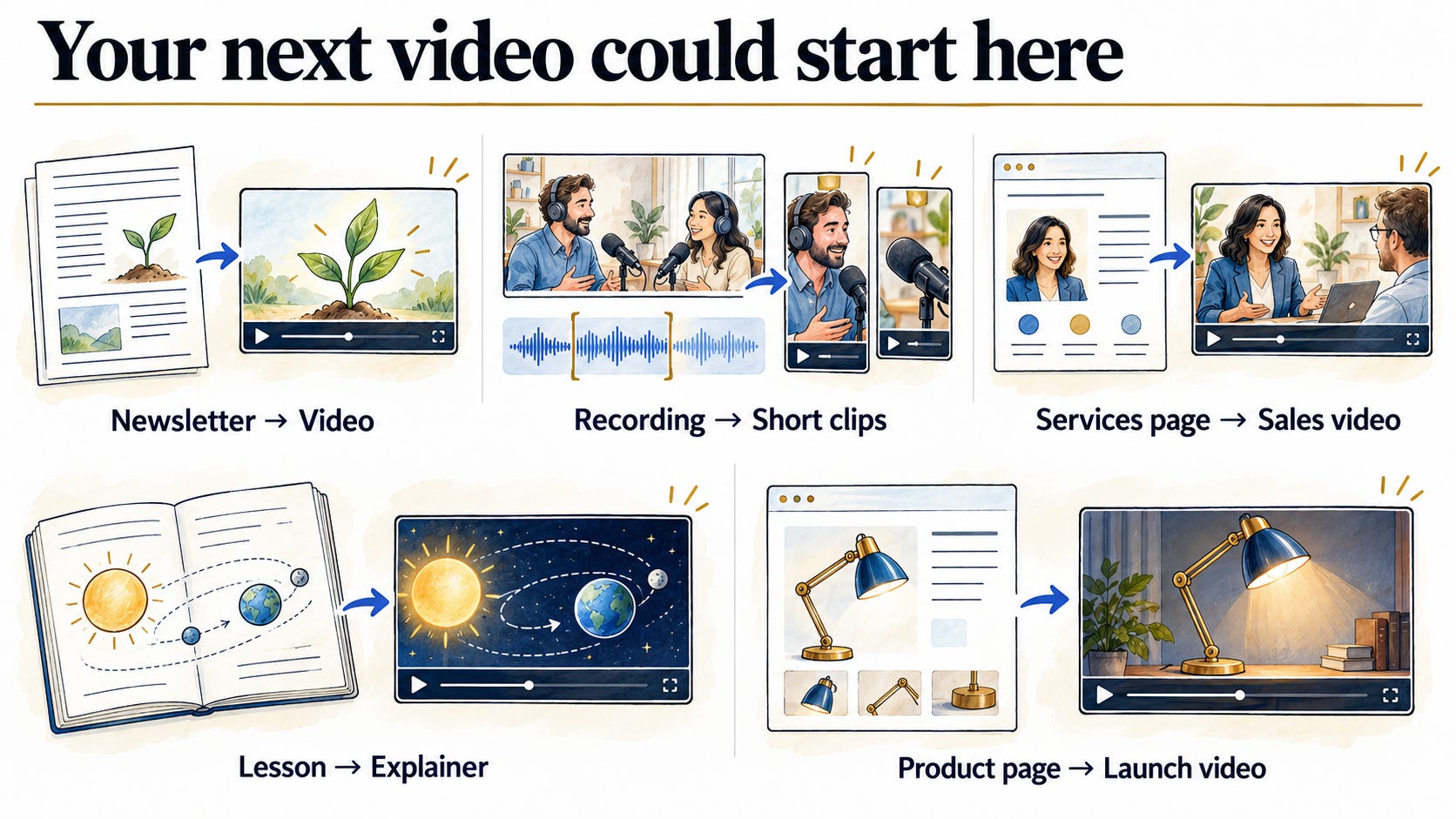
Once Claude can build the video and do the edits with you, the skills stop being what holds you back. The real question becomes what you’d make. Depending on your work, it might look like this:
If you write a newsletter, like me, your posts can become videos too. That’s a way to take ideas you’ve already written into another channel, like LinkedIn, YouTube, Tiktok, IG, or Shorts, without writing anything new.
If you have a podcast or a live show, you already have hours of recordings. You don’t need to hire an editor to cut clips and add B-roll or animation. You can hand a clip to Claude, which makes TikTok, Instagram, and YouTube Shorts a lot more realistic to compete on.
If you sell a service, your services page is enough for a short sales video you can post or send to a prospect.
If you teach, the idea you explain to every new student or client can become a one-minute explainer.
If you have a product, you can make its launch video, or a short campaign around a new feature, from the product page you already have.
Here’s what that looked like when I tried it.
Five videos, five different starting points
For each one, I’ll show you the job it does, what I gave Claude to start with, and what I had to change after the first draft.
1. Selling my consulting: Sprint Receipt
I run a consulting offer called the Workflow Build Sprint through my website aiwithwyndo.com.
Three weeks, one workflow.
We map out your work and its dependencies, build the solution to automate your workflow, then run it on real work and fix what breaks. I wanted a short video for LinkedIn that makes the right person want to apply.
All I gave Claude was my website. Most of the words you see on screen come straight from it.
Then Claude asked what kind of visual style I wanted to use and suggested a receipt.
The reason was that your recurring job prints out line by line, every manual step you do between AI tools: open a new chat, re-explain the context, re-upload the files, paste the meeting notes, copy the follow-up, update the tracker. At the bottom it says “PAID BY: YOU,” and a stamp slams down across it: “YOU ARE THE MIDDLEWARE.”
It took around 15 minutes to generate the first version, but the result still felt off. So I told Claude, “It’s not really clear what the solution is.” So Claude added a section where the whole chain runs from one trigger and stops at a single approval, and I asked for narration too. The video went from 45 seconds to 72. I also asked it to generate the video in 1080x1080, but I can modify it into any format I want.
If you sell a service, or run an agency or consulting business, your services page is enough to start one of these. Let Claude analyze your website, ask it for visuals, and let it cook the whole animation.
2. Turning a newsletter post into something people watch
I wrote a post called “Why Your AI Harness Matters as Much as the Model,” and it’s one I really wanted AI beginners to understand. So I turned it into a video I could share in Substack Notes and on LinkedIn.
When I shared my post with Claude, it gave me three story ideas that we could explore together. One of them was the “genius new hire,” so we settled on that. Then Claude asked me again for the visual style, and we both landed on Synthwave Grid because I liked the retro style.
Next, Claude created two files:
Plan.md: this file contains the idea of the video, the audience, the job, the voice model, and each scene with specific timeframes.
Style.md: this file helps Claude follow a certain set of visual styles that I want it to apply, so it can better understand what kind of visuals I like.
As I mentioned, the story is the genius new hire. The AI model shows up every morning to a blank chat box and waits for another long explanation. The harness is a VHS tape labeled “HARNESS” with five chapters: instructions, context, skills and tools, permissions, and checks. Then a newer model arrives, picks up the same tape (now covered in “+1 lesson” stickers), and starts ahead.
Almost all of the narration is trimmed from my own post. Only one new line was written, and I approved it. This video was done in one shot, but to improve the quality of the animation, it took another 3–4 chats before we both arrived at this version.
If you write anything on the internet, whether it’s long-form essays or social posts, you already have something to say. The only thing left is to turn those ideas into an animated video, just like the one I made.
3. Explaining how we got here: From Chat to Agents
I wanted one video that explains how we went from chatting with ChatGPT to personal agents in about four years.
The whole story runs on one question: how long can AI work on its own? In 2022, the longest task AI could finish by itself took about 36 seconds. By February 2026, it was about 12 hours. The video ties each era to that number. First AI could only talk, then it got tools, then it used a computer and wrote code, and then agents moved onto your own machine. Then between August and the end of September this year, Grok Bot, Instinct, Meta’s Muse, and OpenAI’s Dots all launched, each with its own computer, working while you’re away.

The look came from someone else’s video. I took it from a video by Cole and told Claude to follow that style: glossy app tiles orbiting on a dark background, and short lowercase lines that end in a colored period. Claude used the look and none of their content.
Getting from there to this version took some back-and-forth. My notes on the first draft were that the explanation wasn’t good, it felt too jumpy, the neon looked plain, and I told it to get the stats right. Claude then ran research across the internet to get the data right. After that I asked for a woman’s voice from ElevenLabs, and then one more pass so the camera moves through it as one continuous journey.
I was shocked by how closely the video resembled the original; it’s like Claude can see the video and instantly make a replica of it.
If you have a take on how something in your field has changed, this format fits it: one question, one number that moves, and the products along the way. This format also opens up a possibility where you can ask Claude to research on the internet and visualize how it works so you can understand it better visually. By asking Claude to do the research, you’ll also reduce the chances of it hallucinating data that doesn’t belong to the topic you care about.
4. A launch video for an app I use every day: Wispr Flow
Quick note before you watch: this is an unofficial fan video. Wispr Flow didn’t ask for it, and they didn’t pay for it.
Wispr Flow has had a huge effect on how I work with AI. These days I talk to AI instead of typing to it, and all that talking has made me better at saying what I mean out loud. So I wanted to make it a launch video.
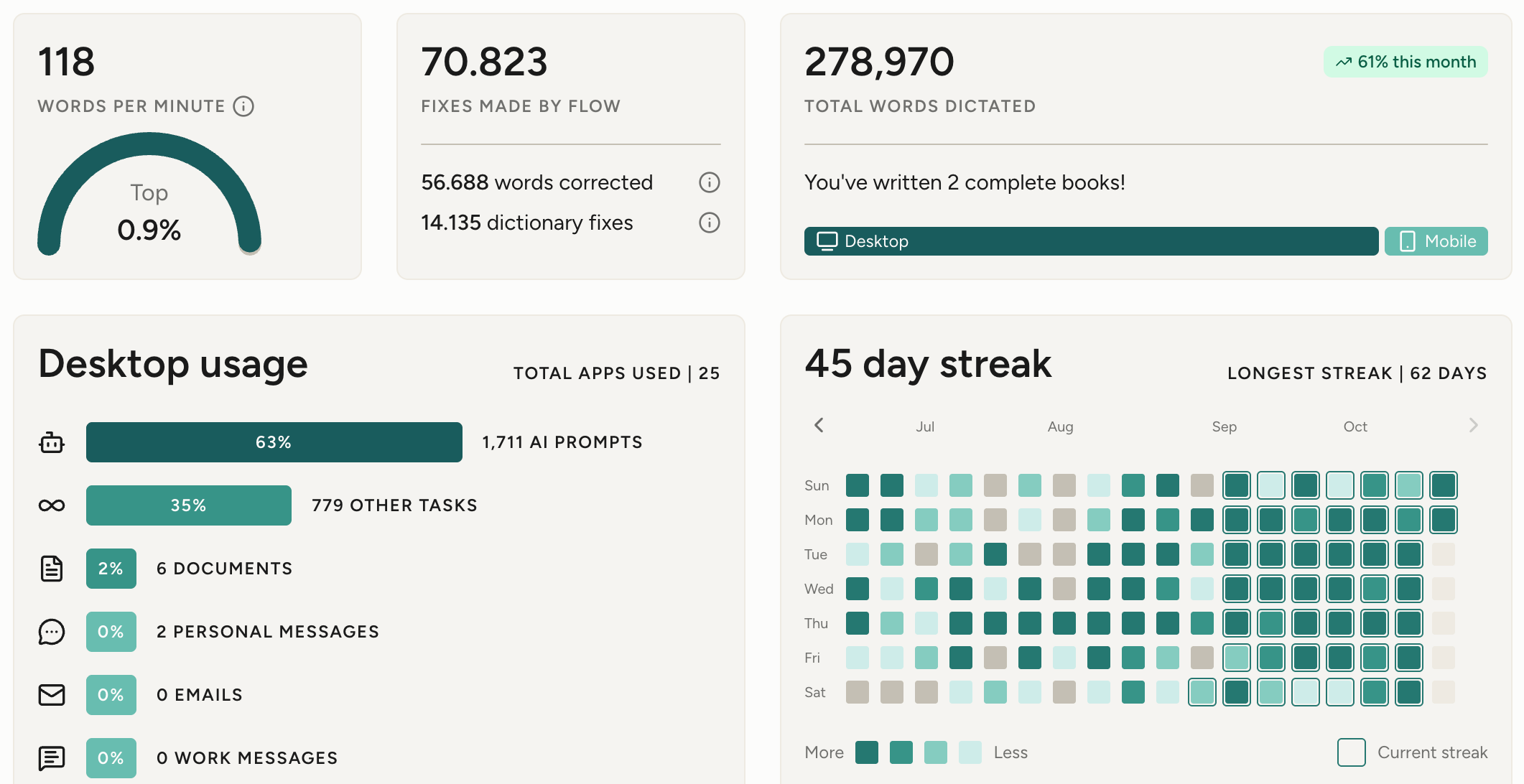
Here’s my current stats at the moment. I’m really proud to be in the top 0.9% of users!
As you can see the video, the style came straight from their website. I had Claude capture wisprflow.ai and use it as the look for the whole video: the same fonts, the same colors, and the little Flow bar with its moving waveform. Every claim on screen comes from their own site, too. Put the video next to the site and it looks like it belongs there.
But the first video draft didn’t look like that. I had to tell Claude that the animation wasn’t exciting and needed way more movement. I also wanted it to show more than dictation. Flow now has Notetaker, which records your meetings and gives you the transcript, so I asked Claude to research the features and show each one next to the problem it solves. Then I asked for a narrator from ElevenLabs. I’m pretty happy with where it ended up.
If there’s a product you love, or one you’re launching, its website is enough to start. You can also spin up a full marketing campaign from it—whether you’re announcing new features, running a discount, or promoting a seasonal offer you want to use to boost sales.
5. Turning a Substack Live clip into a Short: Always-On Agents
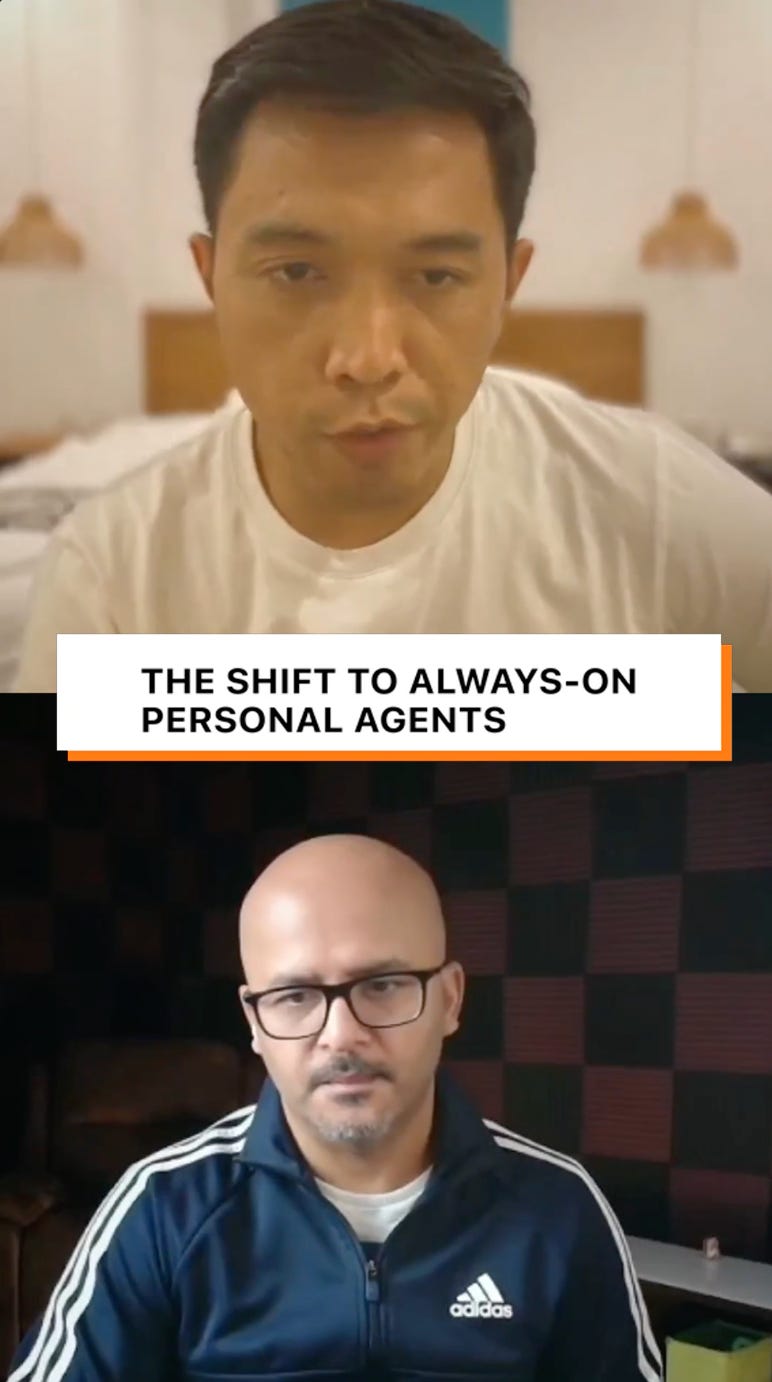
Last week, I talked about OpenAI Dots. After every Substack Live, Substack drops a set of clips into my dashboard that I can use to promote my full video. But the issue was they were just clips from the full video that showed my face and the co-host’s face, split screen, talking.
So I took the one where I explain the shift to always-on personal agents and gave it to Claude. Here’s how the original looks:
And what happened after Claude edited them genuinely shocked me.
Even though my voice stays, but my face moves to a small circle at the top. The co-host’s half of the screen becomes animation that acts out what I’m saying. A laptop has to stay open while you prompt Claude Code. A GitHub repo card turns into a locked gate, because that’s where most people get stuck moving agents to the cloud. Then a board of Grok Bot cards keeps working after the laptop lid shuts.
This is the one I’d try first if you record anything. If you’re trying to grow on TikTok, Instagram, or YouTube Shorts, you can take the clips you already have and let Claude animate them. And if you have a podcast, you don’t need to hire an editor to cut clips and add B-roll. You can ask Claude to do it.
Where I get the ideas and the styles: MotionFeed
So that’s what I’ve been making with Claude.
But you might be wondering where all of it comes from in the first place: how I decide what kind of video to make, what to ask Claude for, and where the styles come from.
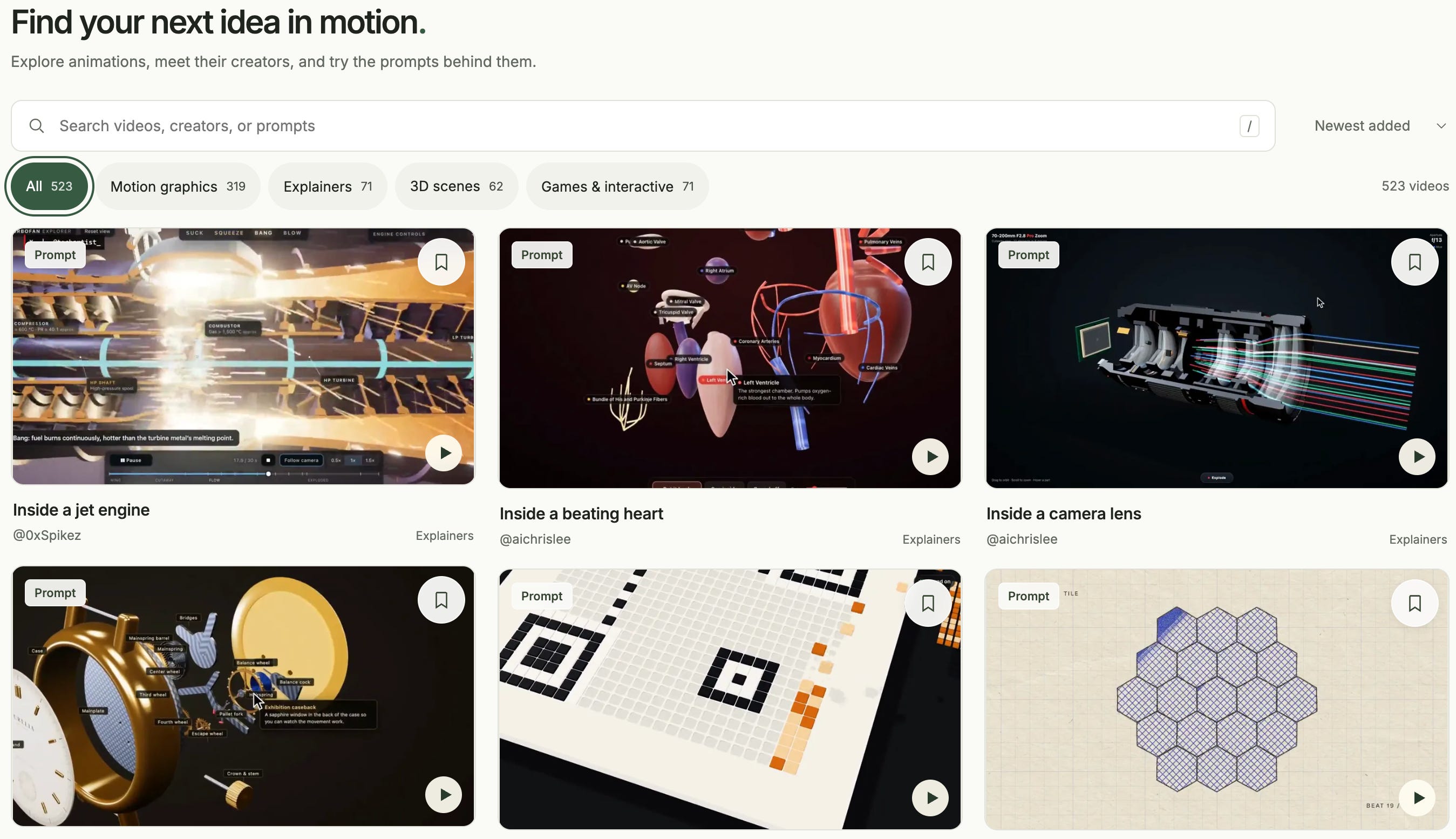
A lot of it starts in MotionFeed. It’s a gallery I built with ChatGPT Sites so I’d have one place to browse the animated videos people post on X. It started from yihui-dev’s Github open collection of Opus 5.5 videos, and as of October 18 it has 523 of them. Each one is credited to its creator and comes with the prompt they used, in full or in part.
Through the ChatGPT Sites feature, I run a scheduled task to monitor whether GitHub has new video feeds I can add to my gallery every day.
I use it the same way every time. I find two or three videos that feel close to what I have in mind, then read what the creator actually asked Claude for. The prompts are worth reading, because they show you what’s possible to ask for.
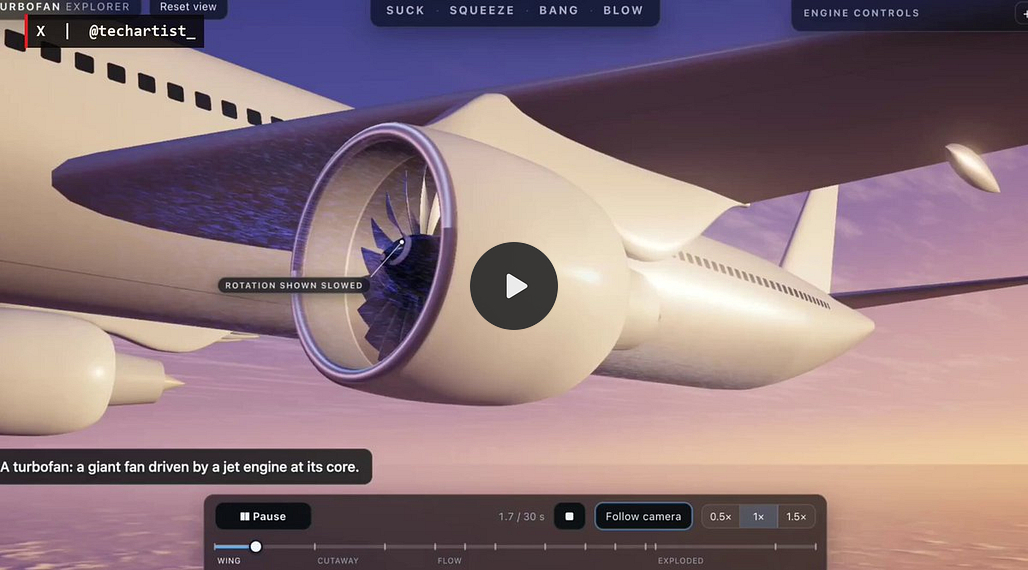
One creator asked for a 3D jet engine you can take apart stage by stage in the browser.

Another asked if an average Claude Code session could become a story.

Ethan Mollick asked for a video explaining recursion where every explanation switches to a completely different visual style.

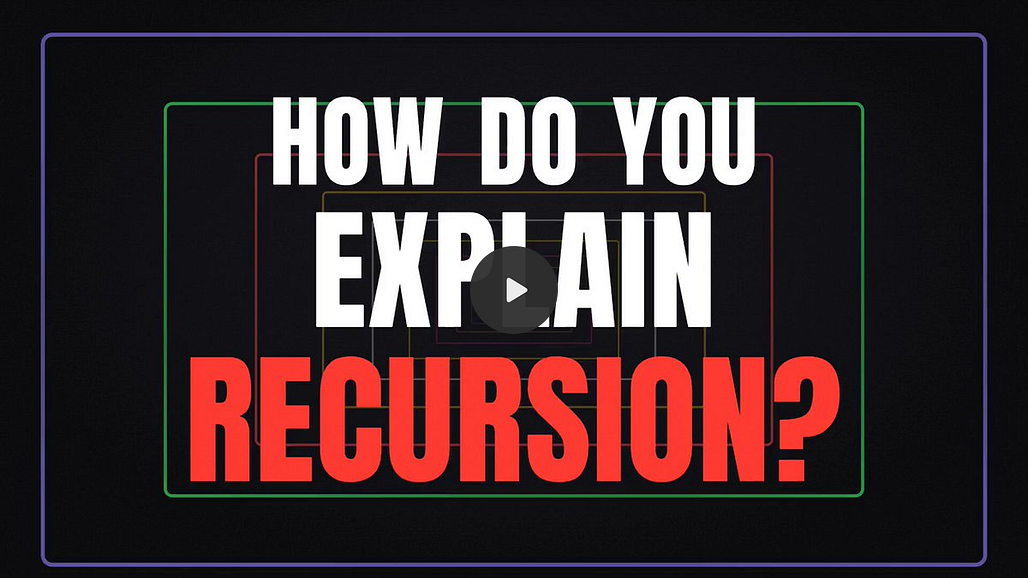
Seeing those makes it a lot easier to picture what you could ask for yourself.
So at this point, finding a look and a prompt is the easy part. You can browse for ten minutes and leave with both. What takes real thought is deciding what kind of video you want to make, what it should say, and how it tells the story from the first second to the last.
And most of that, you already have. Your notes, your newsletter posts, your services page, your product page, the recordings sitting in your computer.
That’s why the skill I built asks me questions before Claude builds anything.
The skill that interviews me first: /video-builder
I built /video-builder last week, and all five videos above went through it.
It works like a short interview. I bring whatever I already have, like my website, a post, or a recording, and it figures out with me what the video should be, who it’s for, and what someone should do after watching. I usually don’t know those answers when I start, and I don’t need to. It suggests, I pick or push back.
Then it helps me find a look. Most of the time I can’t describe the style I want, so it shows me options and lets me react to them. That’s how Wispr Flow ended up looking like their website, how From Chat to Agents ended up following a reference I liked, and how my newsletter video end up using synthwave style. It also remembers what I picked, so my next video can start from the same visual style.
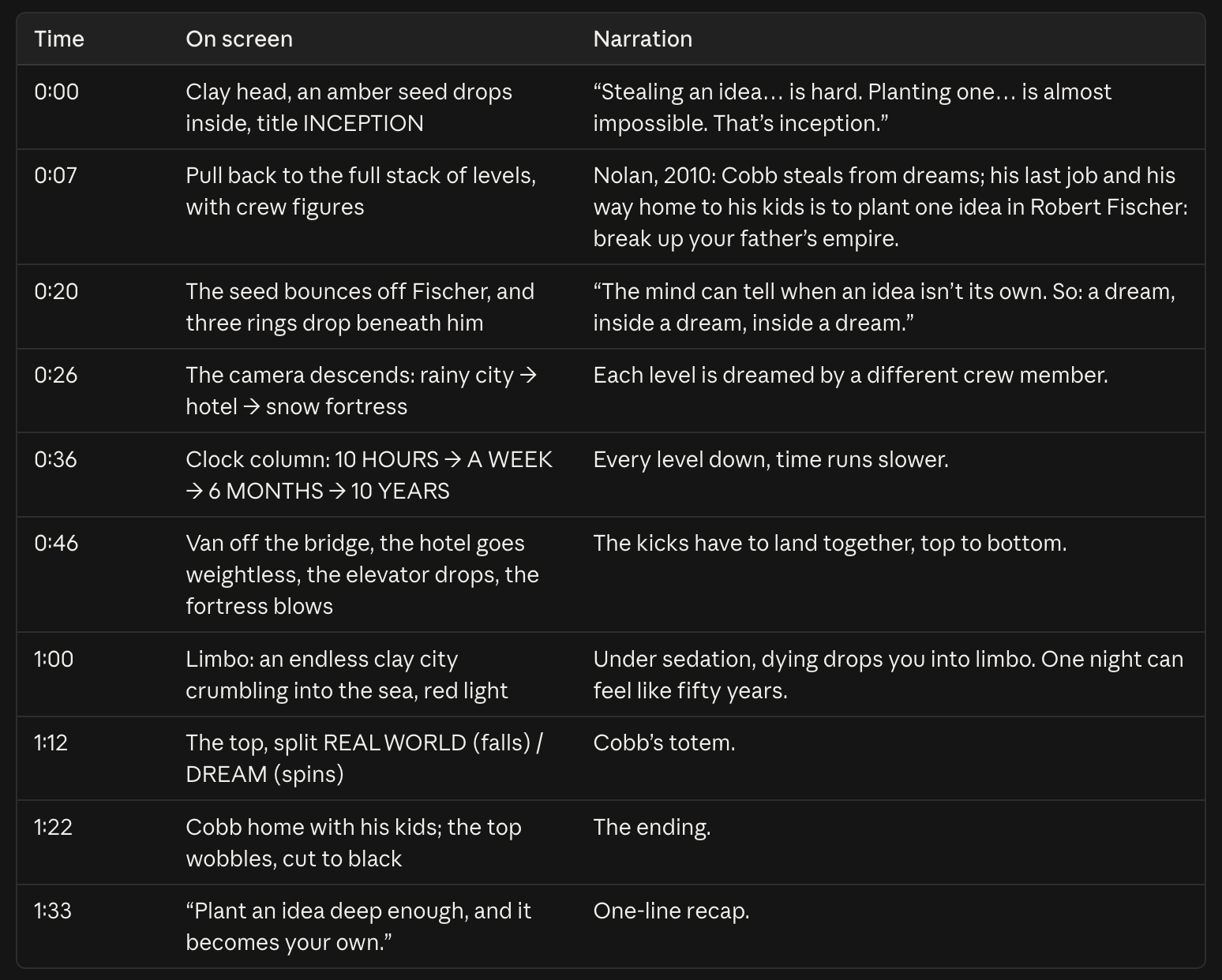
Before anything gets built, I see the whole video as a plan, scene by scene, in plain English. That’s the cheapest moment to change my mind. Then Claude builds it, and I review by clicking on the frame that’s off and saying what I want instead.
For me, the interview and the plan take about 5–10 minutes, and the build takes about 15–30 minutes, depending on how complex the animation is or the length of the video.
One note on quality. I run mine on Opus 5.5 with the effort setting on high or above. Sonnet 5.5 can make these too, but if you want to push what the model can do, Opus is the one I’d use. The catch is that Opus burns through usage quickly, so on the Pro plan ($20 a month) you won’t get very far. If you want to make more than the occasional video, I’d go with Max, which starts at $100 a month.
You can also start without the skill
You don’t need /video-builder to make your first one. Before your next video prompt, answer three things yourself: what you’re starting from (a post, a page, a recording), what someone should do after watching, and which videos look like what you want.
Put those answers in your prompt and you’re already giving Claude more than anyone who just copied a prompt from someone else.
What the skill adds on top is the part that’s hard to do by hand: turning “I like this one” into a look Claude can follow exactly, and keeping that look consistent for every video after. The skill also helps push Claude to deliver high‑quality video instead of a mediocre one.
Make your first one with us on October 23
If you want to build videos like these yourself, Michael Simmons and I are teaching it live this Friday, October 23, from 11:00am to 2:00pm ET on Zoom. It’s the second session of our Agentic Academy Mastermind.
Bring one idea you explain often, or one recording you never did anything with. During the session, you’ll turn it into your first animated video, and you’ll leave with /video-builder to keep for every video after that.
Not sure what video to build? No worries, we’ll help you figure it out during the session. If you can’t make it live, you’ll get the recording along with the transcript, links, and tutorials.
You’ll need a paid Claude plan and Claude Code in the Claude desktop app. Pro works to start, but I’d recommend Max, since you’ll be using Opus 5.5 most of the time and it uses a lot more tokens than Sonnet 5.5.
There are two ways to join
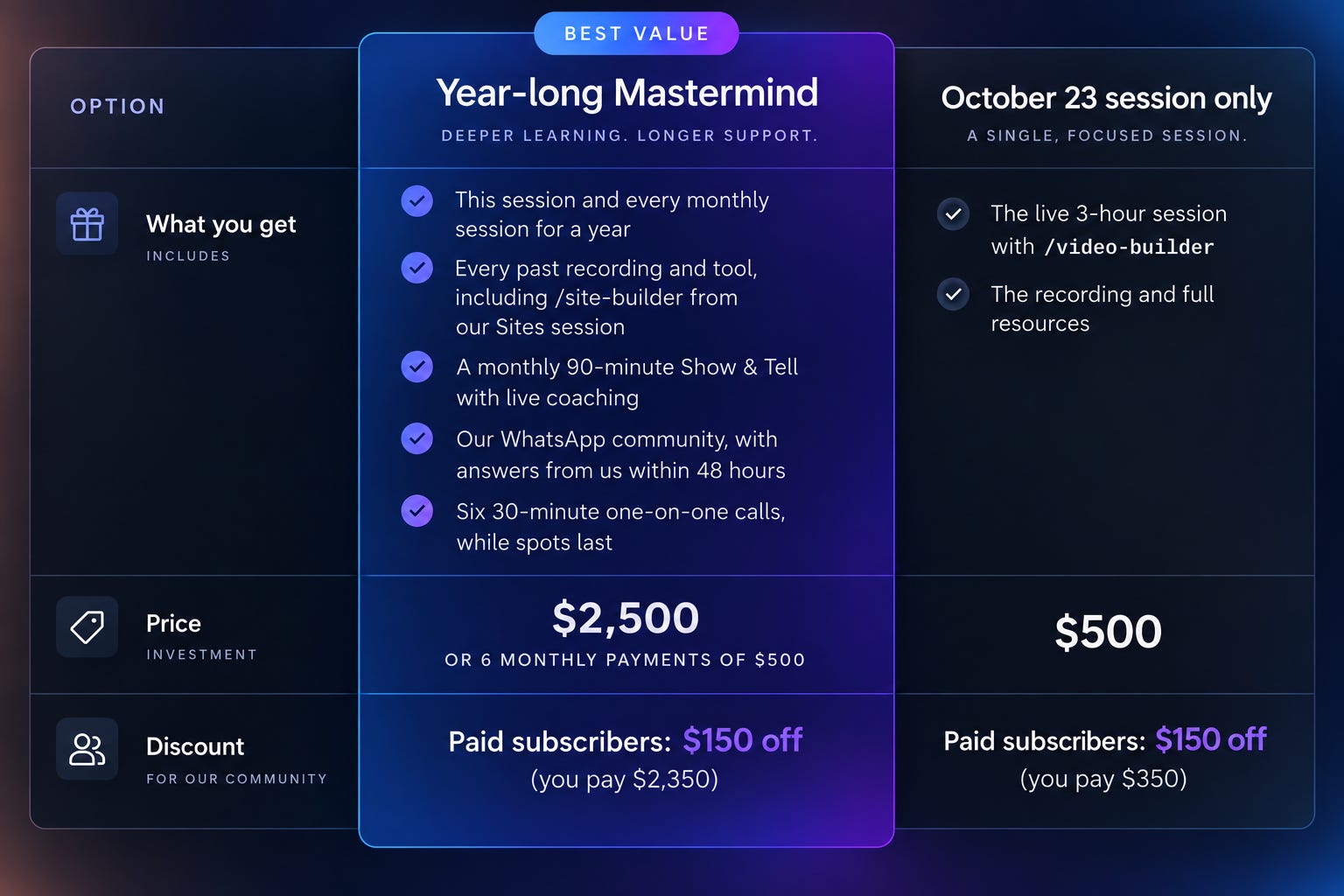
The single session is $500: You’ll get full recording and resources.
The full year is $2,500 (or six payments of $500) for all twelve monthly sessions, plus Build Clinics, a monthly Show & Tell, and the WhatsApp community where you can ask us anything between calls.
If you’re a paid subscriber of AI Maker and Blockbuster Blueprint, you get $150 off both the October 23 session and the full-year mastermind.
If you don’t make a video with what you learned within 30 days, email us and we’ll refund you in full.
Doors close when the session starts: Friday, October 23, at 11:00am ET.
All the details are in the announcement post.
And if you make one, with us or on your own, send it to me. I’d love to see what you come up with.
Here’s the latest video I made to explain the movie Inception. Enjoy!
See you this Friday in the Mastermind session 👋🏻
Best,
Wyndo