



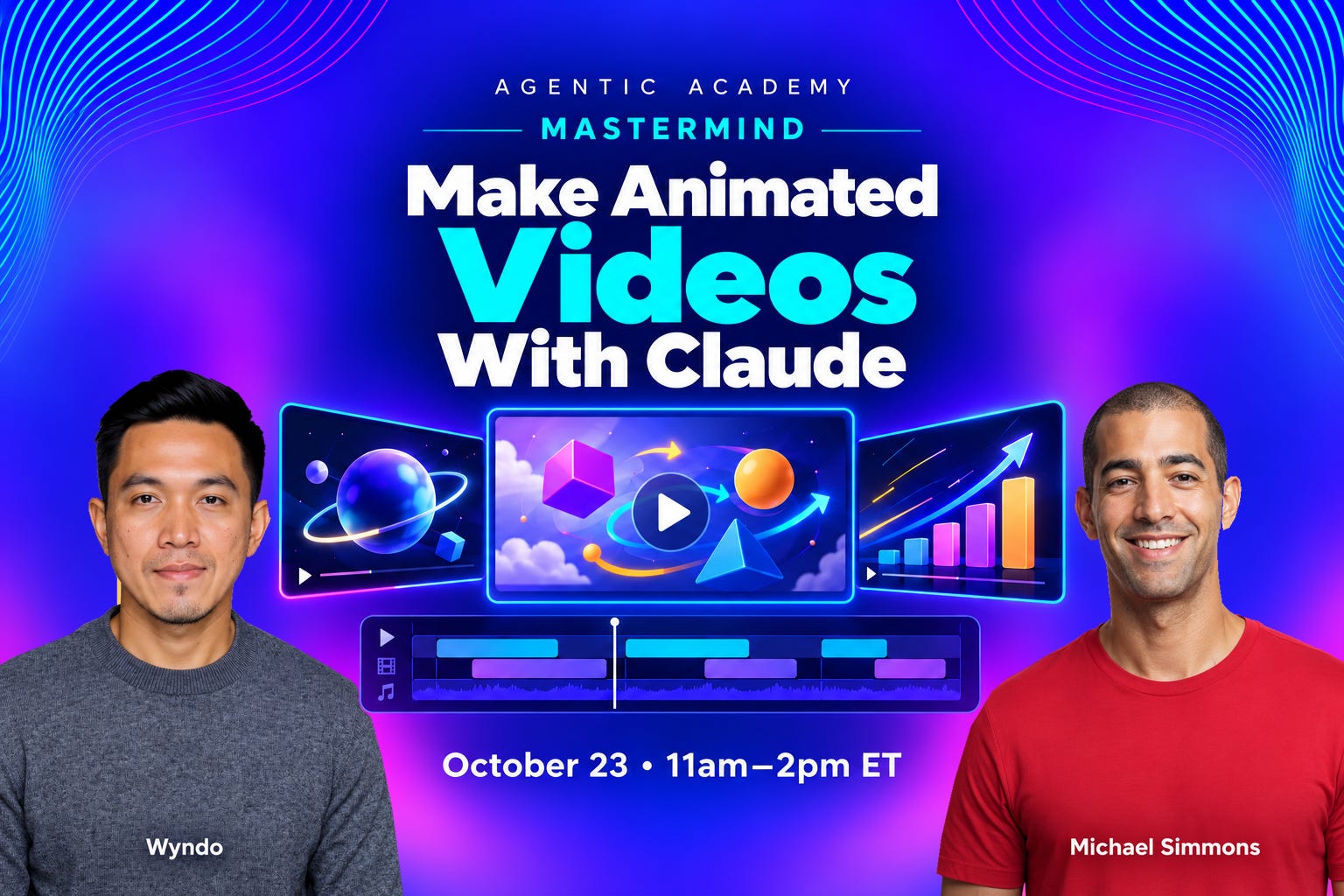
Near the end of our first Mastermind session on October 2, I (Michael) played a short video I’d made with AI:
I built it from video clips I had saved over time with Snipd but was barely using.
Amazingly, it took one simple prompt and just two rounds of edits to create something that would normally have cost $10,000+ and taken hundreds of hours.
The room reacted quickly as people realized they could also build one for themselves with leftover materials:
AI video clips made 15 seconds at a time
Video recordings of coaching calls
Video recordings of sales calls
Video recordings of classes
Raw video riffs you created but never used because they required too much editing
Client testimonials
Photos
Each of us already has the raw material. What we’ve been missing is a fast way to turn it into a finished video.
So on October 23, we’ll show you how to turn yours into a finished video.
The Surprising Power Of Video
Video has three big advantages over text:
People generally prefer video over text
Video makes learning easier and more fun
Videos can help you close deals
#1. People generally prefer video over text
When Wyzowl asked people how they’d most like to learn about a product or service, 63% chose a short video. Only 12% chose a text article.
By creating in video, you can stand out more in the newsfeed and also create content for YouTube, the most-watched streaming platform in the U.S.
#2. Video makes learning easier and more fun.
As an example, consider this book summary I created for a very technical book. Animation lets someone watch an idea unfold, step by step.
#3. Videos can help you close deals
In today’s world, reaching people individually through text is hard, because everyone’s inboxes are crowded. But, imagine being able to record personalized videos at scale. You could include them in:
Personal DMs
Before and after sales meetings
Sales proposals
For example, I recorded the following video to show how AI could turn a raw riff into something that looks super professional:
Video can also be used to announce new product features or events. For example, here’s one my Mastermind co-teacher, Wyndo, made with Claude to announce the October 23 session:
But Video Has Been Really Hard
Until recently, even a short animated explainer meant hiring a motion designer for thousands of dollars or spending days in editing software. Most of us don’t have that kind of time or budget, so most of us don’t make videos.
That changed on September 22, when Claude Opus 5.5 got good enough to make videos like the one at the top of this post. Claude builds each scene like a web page, and a free tool we’ll install together turns those scenes into a finished MP4 that you can watch on your computer, share with friends or clients, or upload to YouTube, Instagram, TikTok, and more. You describe what you want in plain English, and Claude does the building.
Two days after the release, Stephan Livera posted what Opus 5.5 made from a short prompt:

What Would You Make First?
Once you realize what you can do with videos, you’ll find more and more areas in your business where you can use them.
Attract attention
Article or newsletter teaser: a short video that makes people want to read a new article, issue, report, or ebook.
Article or essay video: a written piece (essay, article, speech, story) turned into something to watch.
Book trailer / launch video: makes people want a new book: the big idea, the author, a reason to buy now.
Short vertical video: under a minute, for phones, built to stop the scroll in the first second.
Spoken-word / quote film: one voice, one idea, with images or type built around the words.
Teach
Framework explainer: one big idea of your own, explained in a few minutes, so it sticks and spreads.
Animated adaptation: an existing interview, podcast, lecture, or how-to retold with animation.
Book summary / idea breakdown: the key ideas of a book, usually as drawings or animation over narration.
Data story: animated charts and numbers that carry an argument over time.
Video lesson: a short teaching unit, built so a viewer learns one thing well.
Sell
Free training / launch lesson: a free teaching video, often one of a short series that leads into a paid program.
Course trailer: a preview of a course or program: who teaches it, what you’ll be able to do, a taste of the teaching.
Launch announcement: the polished reveal of a new product, feature, or event, like the one Wyndo made for this session.
Offer sales video: sells one product or program directly by showing the offer and the transformation.
Personal pitch video: made for one specific person or company, such as a prospect, partner, sponsor, or employer.
Upgrade footage you already have
You don’t need to film anything new. But if you already have recordings, Claude can make them look far more polished, adding animated titles and graphics timed to what you’re saying, plus B-roll (cutaways to images or your other clips).
Raw riff, finished: a recording of you thinking out loud, turned into a video that looks professionally produced.
Call or class clip: the standout minute from a coaching call, class, or podcast, shared on its own.
Customer story: a recorded client testimonial, turned into a short story about what changed for that client.
Event sizzle / recap: a fast montage that makes viewers wish they’d been there.
Supercut / montage: clips you’ve saved over time, cut together to reveal one pattern or theme, like the video I played on October 2.
Early Adopters Are Going Crazy For AI Video
You don’t have to take our word for it. Here’s what early adopters said and made in Opus 5.5’s first week:
“Claude Opus 5.5 has the best visual design of any model I have tested so far.”


“…this is genuinely mindblowing.”

“These models are getting ridiculously powerful.”

“I’m still not sure people are fully getting how good opus 5.5 [is]…”

Make Your First Video On October 23
On Friday, October 23, from 11:00am to 2:00pm ET, Wyndo and I will show you how to make animated videos, starting from material you already have.
Here’s what we’ll cover in the second Mastermind session:
What Claude can make now. We’ll show a range of formats, like animated explainers, framework breakdowns, launch videos, and book trailers, so you can see what’s possible before you choose.
Your first explainer video. Pick one idea you teach often. You’ll turn it into a short animated video during the session.
Finding a style you like. Most of us can’t name the visual styles we like. We’ll give you a simple way to collect examples, mark what you like about each one, and turn those notes into a style Claude can follow.
Planning your video scene by scene. Before Claude builds anything, you’ll lay out a storyboard, scene by scene, so the result matches what you pictured.
Starting from your own recordings. You’ll give
/video-builder, Wyndo’s new skill, a transcript of a class, a call, or a voice note. The skill finds the strongest point and turns that point into a video. We’ll also show you how to work from the footage itself, so Claude can add animated titles, graphics, and B-roll to a video you’ve already recorded.Where to use your videos. Posts, course lessons, pitches, client follow-ups, and launch announcements.
Browse What’s Possible
If you’re not sure what kind of video you’d make, start here.
Wyndo built MotionFeed with ChatGPT Sites, the tool we taught on October 2: a gallery of more than 500 animated videos, each credited to the person who made it. You can browse them in four groups (motion graphics, explainers, 3D scenes, and games and interactive pieces) or search by topic, creator, or prompt.
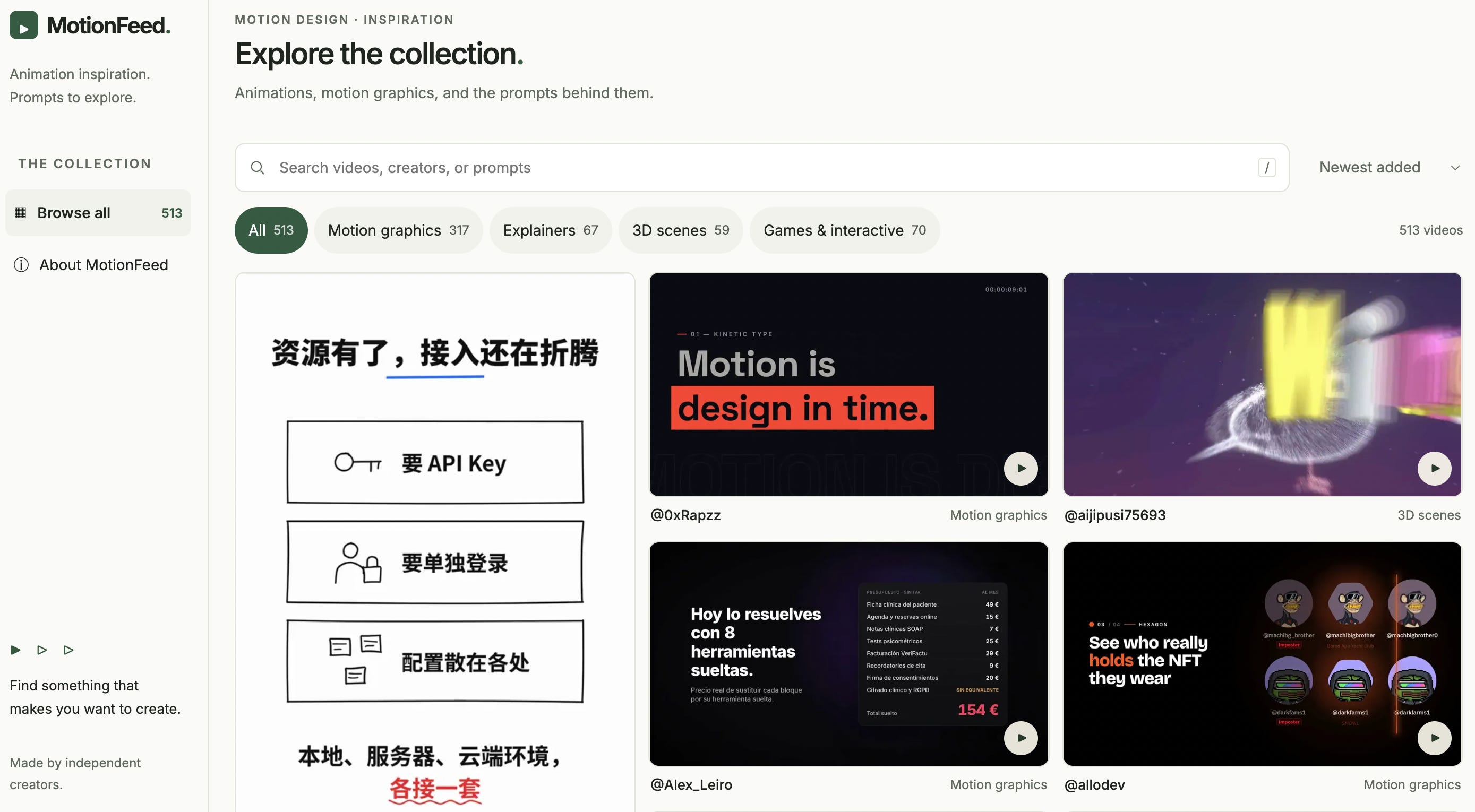
Open any video to watch it, read the prompt behind it when the creator shared one, and jump to the original post.
Those prompts are a useful starting point, but a prompt only gets you someone else’s video. On October 23, the style exercise and the storyboard are how you get your own.
Spend ten minutes there before the session and save two or three videos you like. Bring them on October 23. We’ll use them when we work out your style, so Claude has something concrete to aim for.
What You’ll Need
A paid Claude plan. You can start with the Pro plan, though we highly recommend the Max plan, since you’ll be using Opus 5.5 in most cases, and Opus uses significantly more tokens than Sonnet 5.5.
Claude Code, which comes with your Claude plan and runs in the Claude desktop app.
There’s also a free video tool we’ll use with Claude, and we’ll install it together at the start. If you want narration or music, the tool can add both with a free HeyGen sign-in, or you can use ElevenLabs or a similar service.
What You’ll Leave With
Your first animated explainer video, made during the session.
/video-builder, a skill that reads a transcript, finds its strongest point, and turns it into an animated video. The skill is yours to keep for every video after this one.The recording and full resources: transcript, chat, links, chapter guides, summary, and tutorials.
From Your First Video To Your Tenth
You’ll leave October 23 with your first video and a skill for making the next one. But the first video is the easy part. The hard part comes a week later, alone at your desk, when something breaks, the style drifts, or you can’t decide what to make next. That’s where most people stall, lose momentum, and quietly stop.
This 3-hour session is part of our year-long Mastermind, where members get ongoing support as they use the tools they’re learning. That includes:
Build Clinics. Two 90-minute Build Clinics follow the October 23 session. Bring the video that isn’t working, the idea you can’t storyboard, or the question you’d feel awkward asking anywhere else, and we’ll work through it with you live. Every clinic is recorded.
Show & Tell. Once a month, show off what you’ve built and get live coaching on your work. You’ll also see how other members used the same tools, and borrow what fits your own business.
WhatsApp community. Ask as many questions as you like between calls, and get an answer from us within 48 hours.
One-on-one support. Bonnie Johnston, who leads one-on-one support for the Agentic Academy, is available to work with your directly if you get stuck.
With that support, a first video becomes a habit: the next one, and the one after that, with help each time you need it.
Here’s what Michael P., one of our students, had to say about what this level of support meant for him:
“The high touch kind of concierge meetings were very important for me to be able to ask the dumb questions, to be able to have somebody kind of, hey, that piece you need, I’m going to go get it for you. I’m going to come back. I’m going to send it to you. And then we’re going to spin it up. And then you’re going to see it in action. And the more …handholding, the more chance of success.”
Who The Mastermind Is For
The Mastermind is built for active AI users who aren’t technical. You don’t need to be a designer, a coder, or a video editor.
You’ll get the most out of it if some of these sound like you:
You’ve started letting AI work directly on the files on your computer, with tools like Claude Code and Codex.
You have recordings, talks, or ideas you’ve never had time to turn into anything.
You keep seeing AI demos and thinking “I could use that,” but you’re not sure how to build your own version.
You learn best by building, not by watching.
You want new income from what you already know.
The Mastermind isn’t for you if:
You’re brand new to AI. We assume you already use ChatGPT, Claude, or a similar tool regularly.
You want a roundup of AI news. We go deep on one breakthrough a month instead.
You’d rather watch than build. The value comes from putting each month’s breakthrough to work.
Here’s what Mastermind member Leandra W. had to say after our October 2 session:
“…What I love about the class is that we are always getting information right as it comes out and then taught how to use this.
…being able to do it in class and do it with other people doing it and hearing what they were doing was really inspiring and really helped stay on task. We have the WhatsApp. You can just connect with other people and ask. Everybody’s really generous about sharing how they’re moving through things.
…I was super overwhelmed. I don’t even know where to start. And then it’s like, ‘oh, oh, this is okay. This is actually kind of a breeze once you know how to do it.’
I feel like there’s this window and it will be closing. But if you act now, it’s a prime opportunity.”
Two Ways to Join
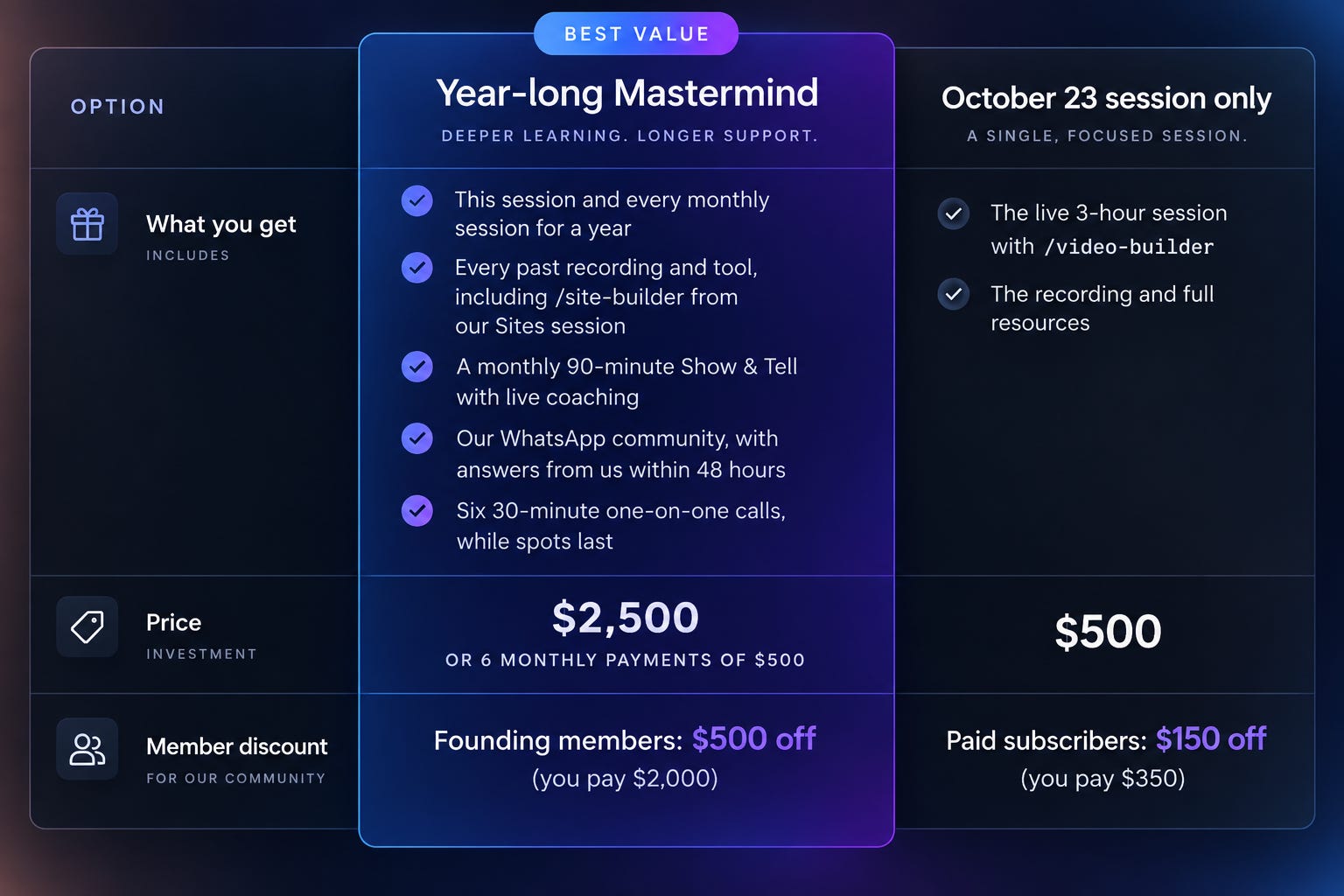
Member discounts are for subscribers of AI Maker or Blockbuster Blueprint. If you qualify, we’ll email you your code.
Why the full year costs less. One session is $500, so twelve would cost $6,000. The full Mastermind is $2,500 for all twelve, plus everything we’ve already covered.
Starting with one session? You can upgrade to the full year later for $2,250.
Doors close when the session starts: Friday, October 23, at 11:00am ET.
FAQ
Do I need to know how to code or design? No. You describe what you want in plain English, and Claude creates the video. The style exercise and the storyboard take care of the design decisions you’d otherwise struggle to put into words.
Do I need to be on camera? No. Most of the videos you’ll make are animated, so your ideas carry them, not your face. If you do have footage of yourself, Claude can work with that too.
I use ChatGPT. Can I still join? The free video tool we use also works with ChatGPT, but we’ll teach and build in Claude, so you’ll get the most from the session on a Claude plan. The Mastermind itself isn’t tied to one AI model: on October 2, we built in ChatGPT, and each session uses whichever tool does the job best.
What if I can’t attend live? Every session is recorded, with the transcript, chat, links, chapter guides, summary, and tutorials.
What will future sessions cover? We choose each month’s topic based on which AI breakthrough has just become most practical and valuable, so we don’t lock in the year in advance. We’ll announce each topic ahead of the session and tell you what it requires.
When does the Mastermind year run? From October 2026 through September 2027, with one three-hour session each month.
Can I join the Mastermind after October 23? Yes. You can join anytime, and you’ll get the replays of the sessions and Build Clinics you missed. Join before October 23 to take the video session live.
What if I’m not sure about the year-long commitment? If you’d rather start with just one session and decide later, you can join the October 23 video workshop by itself for $500. You’ll get the live session, /video-builder, and the recording with all its resources.
The single session doesn’t include the October 2 replay, the Build Clinics, Show & Tell, the WhatsApp community, the one-on-one support, or the other ten sessions. If you decide to upgrade later, the upgrade will be $2,250.
Single-session sales close when the session starts: Friday, October 23, at 11:00am ET.
How is this different from the 10-week Agentic Academy cohort? The cohort teaches the fundamentals of working with AI agents. The Mastermind keeps you current after that, going deep on one new breakthrough each month.
What’s the refund policy? Make a video with what you learned within 30 days. If you don’t, email support@thoughtleader.school within those 30 days and we’ll refund you in full. If you’re on the payment plan, we refund what you’ve paid and cancel the remaining payments.
What did the last session cover? On October 2, we built websites with ChatGPT Sites. Read the recap. Full-year members get that session’s replay, /site-builder, and the replays of the two Build Clinics that followed, the day they join.
Your best ideas are already sitting in your recordings. On October 23, we’ll help you turn one of them into a video people will actually watch. Join for the year, and we’ll be there for the next video, and for every breakthrough after that.
Your best ideas are already sitting somewhere on your hard drive. On October 23, we’ll help you turn one of them into a video people will actually watch.
See you on the 23rd,
Michael and Wyndo