


I subscribe to a lot of AI newsletters because keeping up with what’s happening in the industry is part of my life. The good thing is I already have sources I trust, so I don’t need to find new ones every week. But the issue is that opening each email and reading through everything takes more time than I can give it, especially when some of the news has very little to do with how I work.
After all, not every piece of information deserves my attention.
Fortunately, across those newsletters, I already know what I want to understand. It’s simply some kinds of AI news that have a practical application for people like me in my everyday work. For example, is there something I could try? A way of working I could learn from? Those are the things I want to spend more time exploring.
As someone who lives and breathes AI, I’d rather spend my time getting my hands dirty with AI tools than reading papers or doing extensive research on how the industry is adapting to AI. I know this is also important, but it’s not my priority at the moment.
So I built a skill called AI News Intel and set up a routine to run it every week. In my current setup, it helps me process more than 50 newsletter emails a week, filter out information that isn’t relevant to my work, and bring together the things worth paying attention to.
The briefing arrives in my inbox at 9 a.m, and I read it every Monday. Along with the relevant news, it proposes ideas I could explore for my next post. I go through those suggestions and decide which ones I want to pursue. That has helped me keep up with AI while giving me a starting point for deeper research.
Here’s an example of one section in the briefing where it gave me a list of new AI tools worth trying:
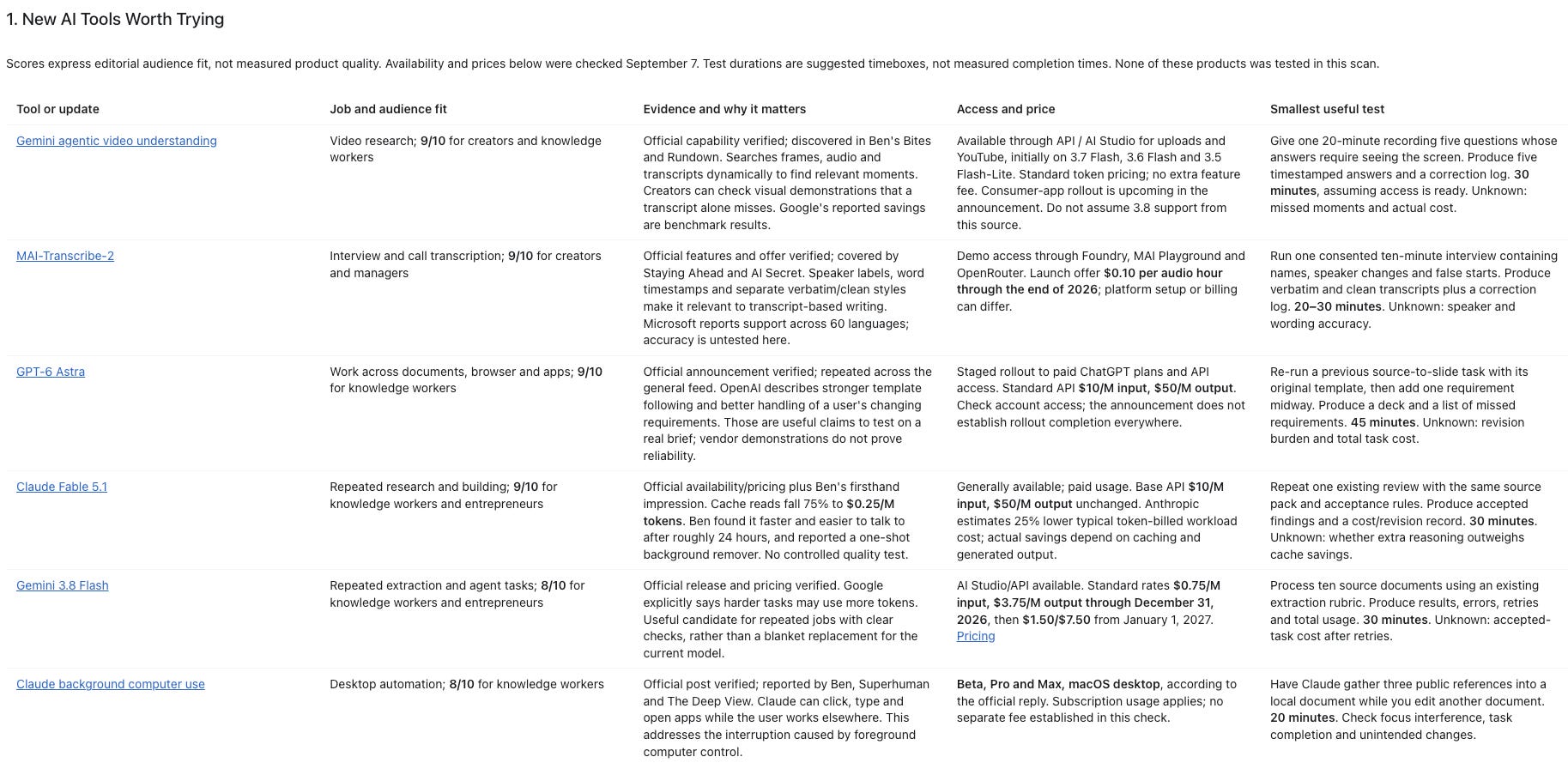
There are five components in this section:
Which tools I need to try
What types of jobs and audiences those tools are best suited for
Some evidence and why it matters
How easy they are to access and how much they cost
What the easiest ways are to test them
This section is one of my favorites because it gives me a clear understanding of which new AI tools or models all those newsletters are talking about, giving me the clearest signal on what to do next.
But before we go deeper into the details behind this AI News Intel skill, I want to explain two main features in agentic AI that make this process fully automated, without me manually prompting anything on my laptop. These are the skill that tells the agent how to do the research, and the scheduled routine that runs it each week.
My newsletter subscriptions are the example, but you can apply the same approach around the information you need for your own work.
A Skill Saves How I Want the Research Done
Let’s start with the skill, because the details behind that five-part tool list are written into its instructions.
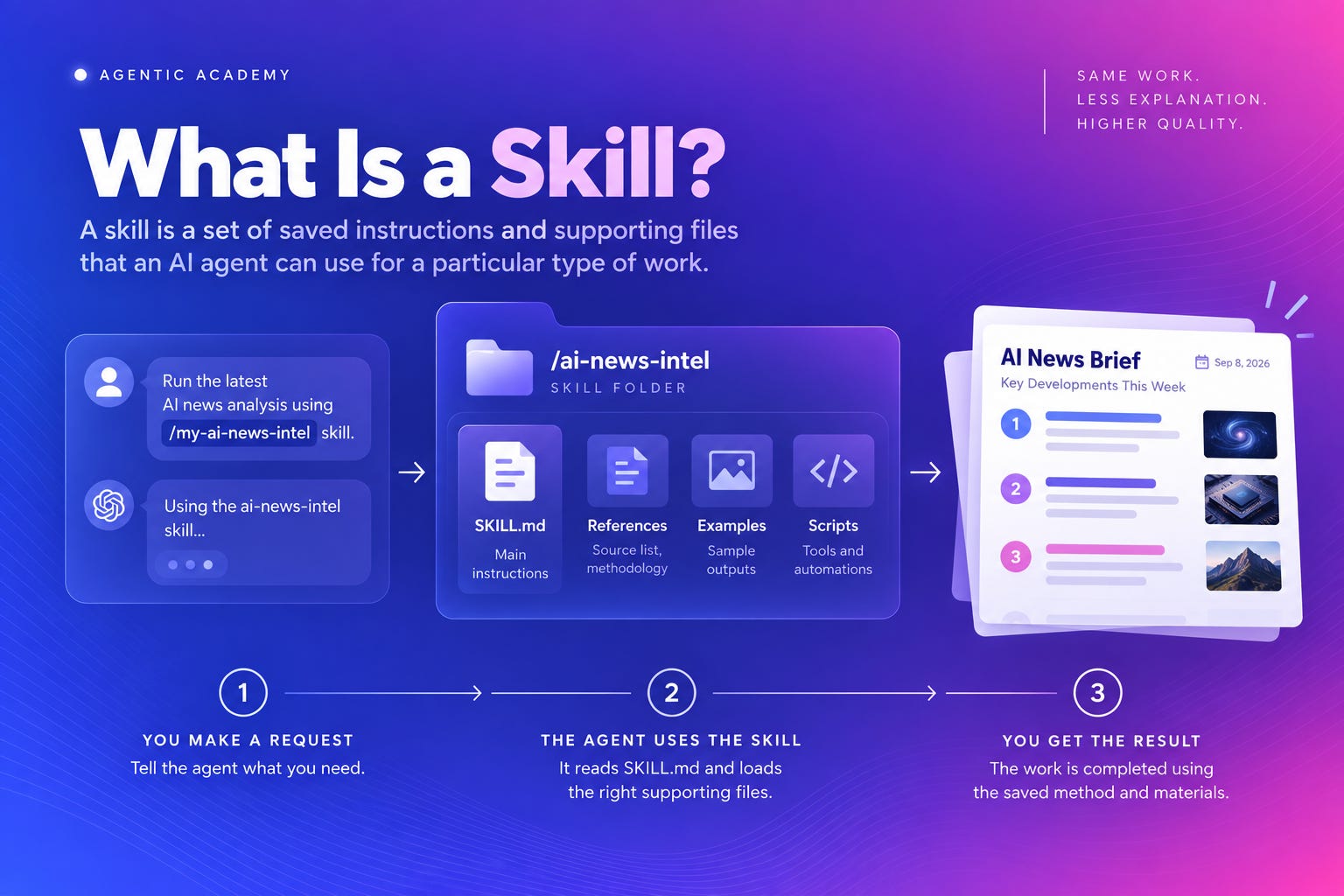
A skill is a set of saved instructions and supporting files that an AI agent can use for a particular type of work. Its main instructions live in a file called SKILL.md. When the agent uses the skill, it reads those instructions first to understand the job, the method to follow, and what it should return.
The skill can also include reference material, examples, assets, or scripts. The main instructions guide the agent to the supporting files it needs for the particular request. It can read a reference, follow an example, or run a script when the task calls for it, without loading everything at once.
That means you can save both the method and the material needed to carry it out. The next time the job comes up, the agent can use them again without you explaining the whole process from scratch. The review draft I wrote last week is also using Skills.
These features are available across any AI agent platform, whether you are using Claude Code/Cowork or ChatGPT Work (Codex).
For my newsletter research, those instructions live in a file called SKILL.md, with supporting files for things like the report format.
The opening instruction says:
“Create a weekly intelligence report that helps Wyndo decide what to test, ignore, or turn into AI Maker content. Preserve source evidence, separate firsthand use from promotion, and prioritize operating methods over feature lists.”
That gives the agent a purpose for reading and summarizing signal from newsletter I subscribe to. The supporting report template then spells out the five components you saw above, so each AI tool found in the report should help me decide whether and how to try it.
On top of the opening instruction, it tells the agent to find newsletters under my Gmail label called “AI News” and use the past seven days as the default timeframe unless I ask for a different period. It further defines how to handle repeated stories to analyze a trend, when to check a claim against its original source, and how to organize the findings into a report with links I can follow.
I give my agent access to my Gmail account through app connectors in my Claude account. Without this, the agent wouldn’t be able to pull all the newsletters I’m subscribed to. I also use a dedicated Gmail label to narrow the agent’s scope so it doesn’t read emails outside that label, which makes the results more accurate.
Once those instructions are saved, I can ask the agent to use the skill whenever I need a briefing. For my weekly research, I also want it to start without me remembering to prompt.
That’s where the scheduled routine comes in.
A Scheduled Routine Runs the Research Every Week
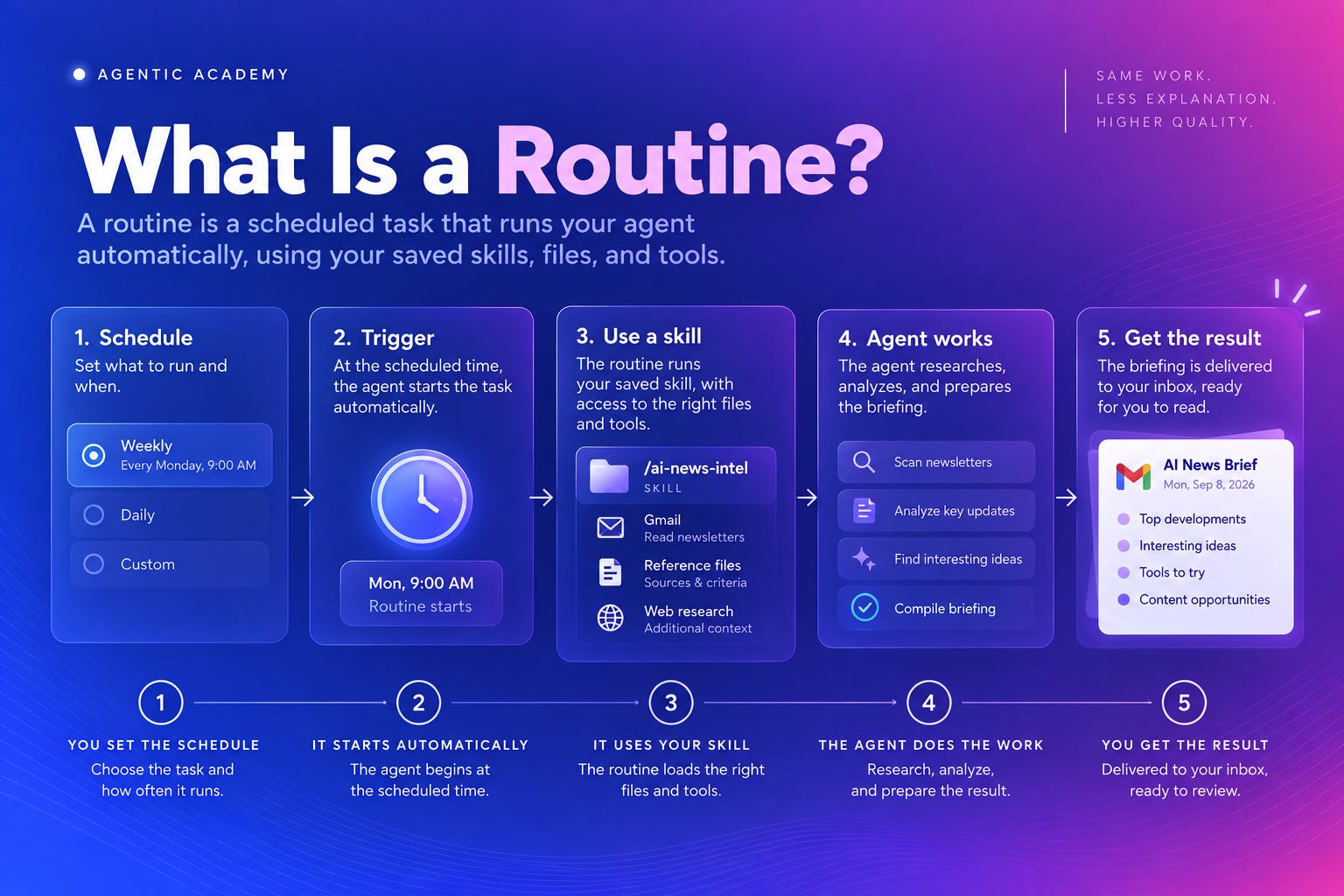
A scheduled routine gives the agent a saved task you can run at a time you choose. You decide what it should do and how often it should run. When the schedule comes around, the agent starts that task without waiting for you to open a chat and type the request again.
For example, Claude Code’s routines can start work on a daily or weekly schedule and use skills available to that run. The routine still needs access to the skill’s files and the connected apps the task depends on. For newsletter research, that includes access to my Gmail.
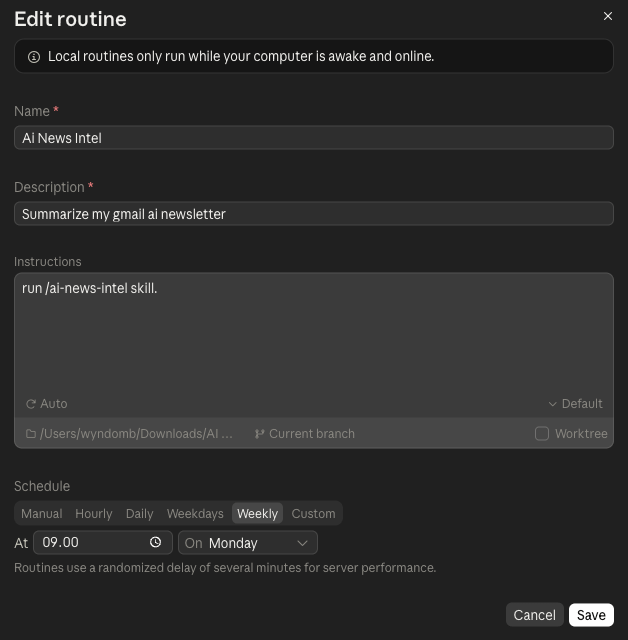
In my case, the recurring job is to use AI News Intel to review the week’s newsletters and prepare the briefing. The schedule starts the work, and the skill guides the agent through the research. Getting the result into my inbox is also part of the job I want completed, so I have it ready for my Monday reading.
There are two timing decisions here: how often to run the task, and how much news to include. My weekly briefing covers the past seven days. If I wanted a daily version, I would also change the research period so it focused on the latest day’s emails. Otherwise, I could end up reading much of the same news again the next morning.
Weekly works for me because I want a useful set of ideas to consider for my next post. Once the briefing arrives, I review the suggestions and choose what deserves more attention. The next part of the research starts with that decision: which of these ideas is worth trying for myself?
How a Product Announcement Became a Research Idea
Here’s an example from the briefing compiled on September 7. Ben’s Bites and The Rundown AI had covered Gemini’s agentic video understanding. Google described a way for Gemini to search and inspect relevant parts of a video across its visuals, audio, and transcript. You can read the announcement here.
The briefing connected that announcement to a practical research problem: when you’re watching a recorded demonstration, some of the useful information is on the screen. A transcript might capture someone saying “click here” without showing which button they clicked or what happened afterward.
So AI News Intel proposed a small test. Take an existing recording, ask five questions whose answers require seeing the screen, and check the timestamps in the response against the video. That would help assess whether the tool could find useful visual evidence and where it missed something.
That suggested test could become an experiment: can AI find the part of a tutorial you actually need?
That gives the research a clear question to answer. If the test works, there is something useful to show readers. If it misses a step or misreads the screen, that is something worth showing too.
Another thing I want to highlight about the briefing is that it left out stories about robot fights, racing robots, and AI toothbrushes, because they offered little immediate value for the kind of work I cover. Seeing what was included and what was excluded also helps me judge the skill itself. If the results don’t match what I find useful, I can adjust the instructions before the next run.
What Would You Want Your Newsletters to Help You Research?
My version follows AI developments and suggests things I could test or write about. You could give the same process a different research question, depending on what you do:
If you’re a trader or investor, you could gather newsletter coverage of a company you’re researching, compare the arguments different authors make, and identify claims to check against its earnings reports and filings.
If you’re a business owner, you could follow developments in your industry and ask which changes might affect your customers, suppliers, or competitors. The briefing could suggest questions worth investigating for your business.
If you’re a marketer or consultant, you could look for campaign examples and experiments relevant to a current project, with notes on what would need adapting for your audience or budget.
If you’re a researcher or educator, you could use newsletters to discover studies and teaching examples, then get a shortlist of original sources to read more closely.
If you’re exploring a career move, you could track the projects, tools, and skills discussed in industry newsletters and use those findings to plan what to learn or ask people working in the field.
Each of these gives the agent a reason to select one story over another. A company announcement might matter to you because you’re researching an investment, preparing a client conversation, or considering a job there. Explain that purpose in your instructions so the briefing can help with the decision in front of you.
Try It With the Newsletters You Already Read
Start with a few newsletters you trust and one question you want to explore. If your agent has access to your email, point it to the relevant label or senders. Otherwise, paste or attach a few newsletter issues. Then try this prompt, replacing the bracketed parts:
“Review [newsletter label, senders, or attached issues] from [date range]. I’m researching [topic or question] for [my work or decision]. Prioritize [what matters to me] and leave out [what isn’t relevant].
Give me a short briefing of the most useful findings. For each, explain why it matters to my question, include the source and date, and suggest what I could investigate or test next. Combine repeated coverage and distinguish reported facts from author opinions or sponsored claims. Flag anything that needs checking against an original source.
Tell me which newsletters you could access and note any gaps. If you can’t access the material, tell me what to provide.”
Read the result and pick one finding to verify against its source. Also notice what you would have left out. That feedback gives you the beginnings of how you want the brief to be presented.
Once the briefing is useful, you can ask your agent to turn the method into a skill and help you set up a routine. Choose a time when you’ll actually read and use the result. For now, start with one briefing that gives you something worth following up on, and then refine from there.
This is how AI should be used. I built a copilot agent that scans all my emails/teams chats first thing in the AM and turns them into insightful, actionable Monday morning brief so I know where I can be most productive for the week. It def helps prevent distractions especially for my ADHD self.