


Earlier this week, I shared why ChatGPT Sites is one of the few game-changing moments I’ve had with AI.
Today, I want to go deep on one site I built so that you understand why I’m so excited.
A few details on it:
It’s the first one I built.
It took me 15 hours to create.
A developer and designer would’ve charged tens of thousands for it.
I use it 10+ times per day.
It’s the one that showed me the potential of ChatGPT Sites.
It’s called See Then Build.
By understanding one example deeply, you’ll be able to better understand how Sites can make a big difference in your life and business.
With that said, let’s jump in.
Here’s the problem I was trying to solve…
Nobody Knows What AI Can Do, Including The People Who Built It
AI’s abilities aren’t installed by AI researchers. They emerge from training, which is why nobody can list them all, including the labs themselves.
With every release of an AI model, the gap between what AI can do and what people think it can do grows bigger. This gap is called Capability Overhang:
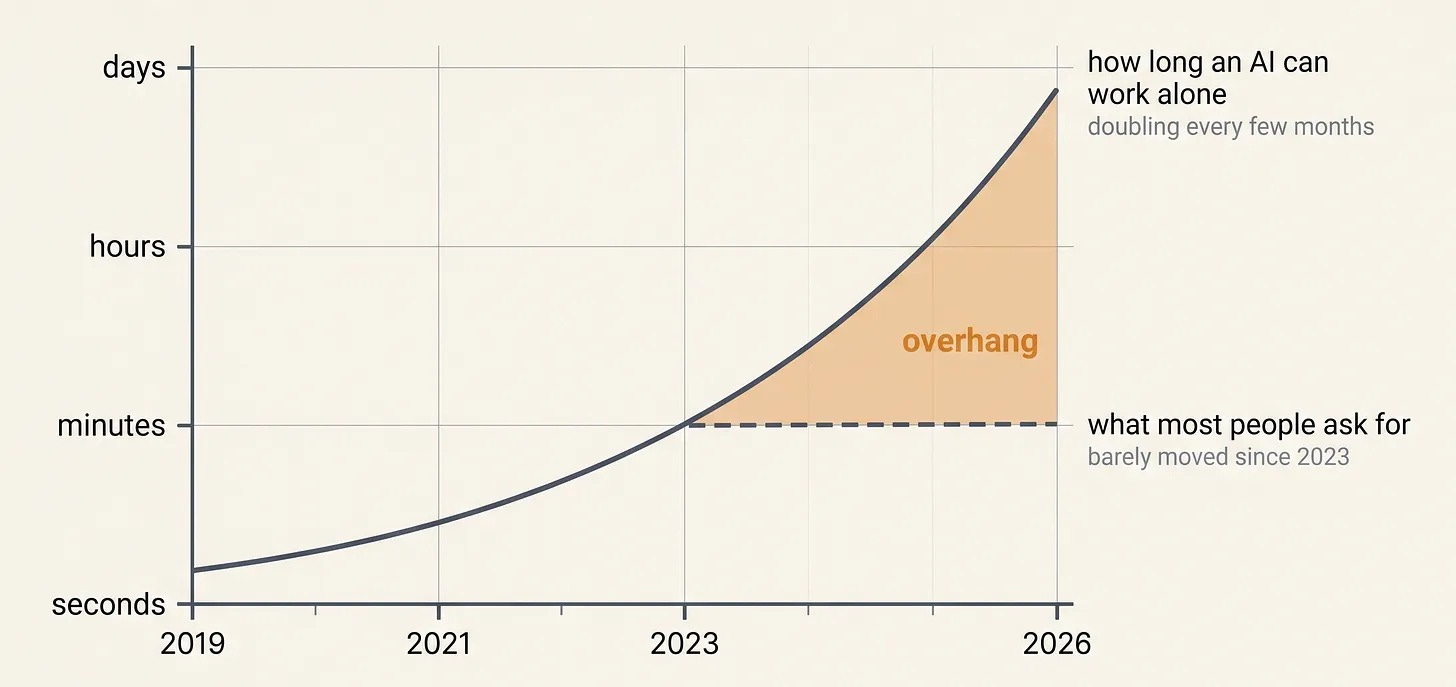
This increasingly large gap raises a question:
How do we stay on top of what AI can do right now as models explode in capability?
The best answer I’ve found isn’t reading model release notes or benchmark results. It isn’t even tinkering myself, though I do plenty of that. Rather, it’s this:
Watch a curated feed of what millions of other AI tinkerers are building.
Brainstorm how to remix what they’ve made with whatever I’m working on.
When you combine the millions of people experimenting with AI, you can tap into billions of collective hours of experimentation.
Someone else’s successful experiment does two things:
It provides inspiration. It’s the equivalent of seeing someone run a 4-minute mile. Seeing is believing.
It gives AI a reference. AI is really good at remixing something when it has a reference it can build on.
Each amazing AI result someone gets is a window into a capability that didn’t exist a few months ago.
But curating great AI demos is not easy with today’s tools:
Looking for the posts on X is time-consuming.
Going on to X is distracting.
X’s bookmark system is notoriously hard to use.
Posts are mixed in with hype, reposts, and noise. They disappear from my feed within hours. And when I want to find one a week later, it’s hard.
As a result of these challenges, I was spending 30+ minutes a day hunting for posts that I’d seen, but couldn’t remember where.
The most valuable signal in my feed was stuck inside the worst filing system I owned.
So I built a better one…
See Then Build Helps You Stay On The Frontier Of AI
I share the details of my system so that you understand how it works and can create your own version.
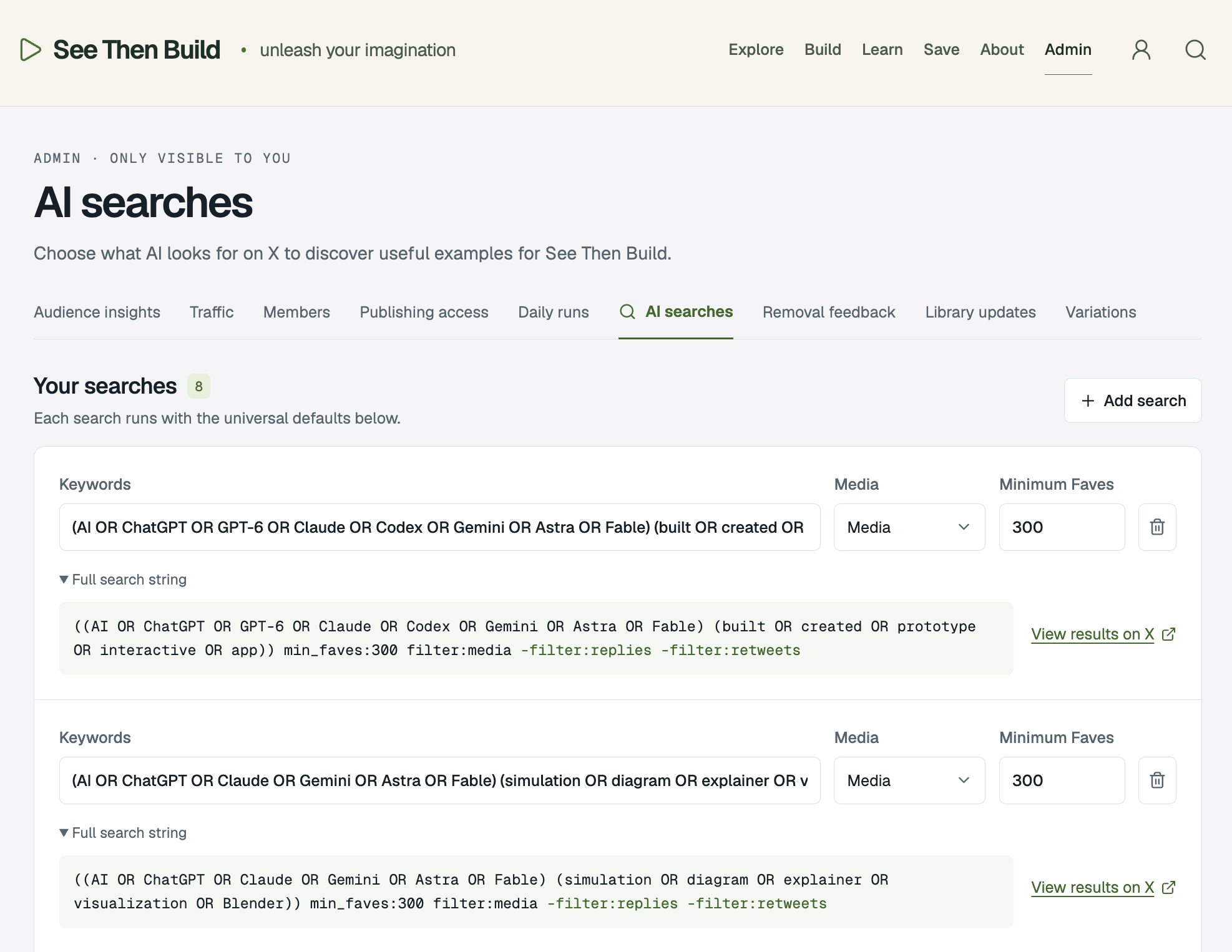
Every night at midnight, a ChatGPT scheduled task automatically searches X for new AI demos using the following rules:
Certain keywords that match the ones I’m looking for
A minimum number of likes
A playable video or photo of the actual creation
Details on the tools, prompts, and process that made it
I built an admin back-end section for See Then Build so I can easily add, edit, or remove searches:
The results go into a database. When I wake up, a new edition is waiting with lots of demos for me to check out.
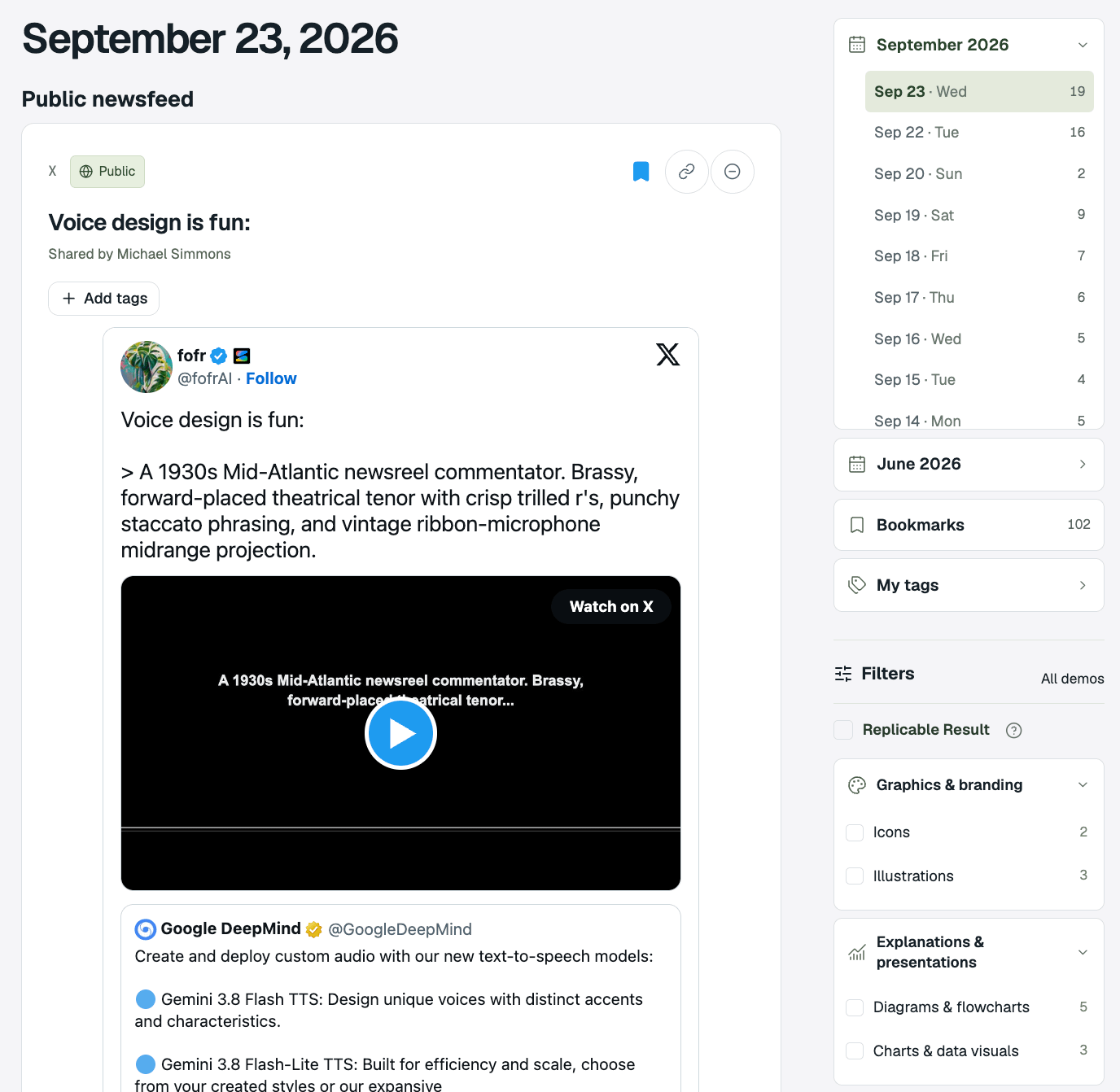
This feed is the opposite of an algorithmic feed in many respects:
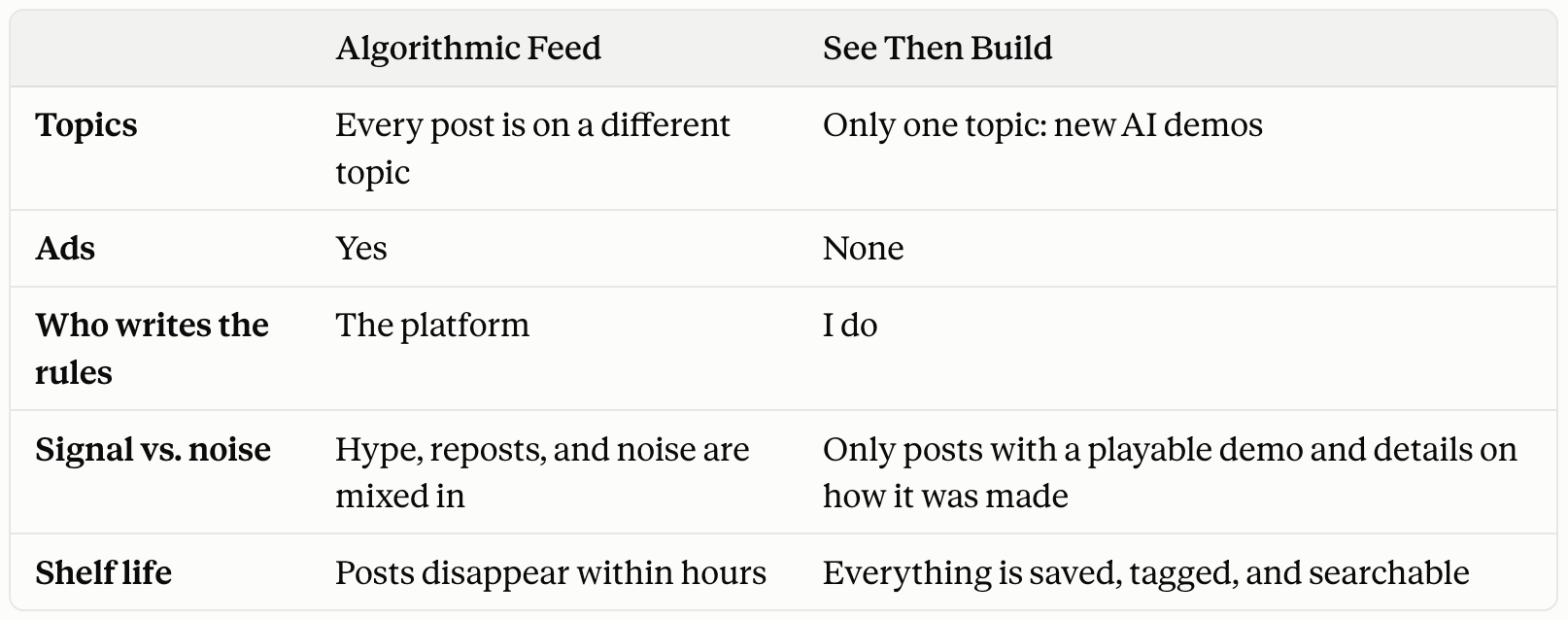
For each demo, See Then Build shows me:
What it makes possible, in one line
Three ways the idea could be used in real work
An evidence label, so I know what’s been verified and what’s only claimed
The creator’s original prompt or files, when they shared them

Then I bookmark the ones I want to come back to, tag them, add a note about what caught my eye, and search everything I’ve saved.
In September alone, See Then Build has surfaced 60+ super helpful demos.
That’s the core functionality, but this custom site also has a number of other features:
An explore page that makes it easy to rapidly explore all the visuals in a collage format.
A prompt builder that helps you recreate any demo you find on the site.
A library of tools that the creators used to create the demos.
A tech stack explainer so you can decide what tech is relevant for what you want to create.
A library of tutorials related to creating things with AI.
A Chrome extension to save an X post or website to the site.
And on top of all that, See Then Build also allows user accounts: after five visits, if you want to keep using the site, you’ll be required to enter your email address. Once you do, you can log in to start your own collection of saved inspiration and use the included tools to design your own projects.
Now that you understand the features, I’ll share five concrete examples of really cool things I’ve recently seen via See Then Build that inspired me to create things that I actually use.
Every Day, Someone Posts A Demo That Makes Me Stop Scrolling
Here are the five examples:
An Interactive, Narrated Bookshelf
A 3D App That Pulls Apart The Male Anatomy
A 3D Illustrated Explainer
A 3D Physical Space Walkthrough
A Cool Visual Light Show Effect
#1. An Interactive, Narrated Bookshelf
Credit: MengTo
This inspired a 3D book library we’re building into BlockbusterOS, which is an AI harness that helps people create blockbuster articles. You can see an early version of a bookshelf I created here in addition to a library you can move around.
#2. A 3D App That Pulls Apart The Male Anatomy
Credit: @ashebytes
This inspired me to create a similar tool for mental models.
#3. A 3D Illustrated Explainer
Credit: Haider
This inspired me to create an illustrated video explainer in the voice and tone of David Attenborough for my MODELS system. You can see a rough version of it below:
#4. A 3D Physical Space Walkthrough
Credit: Ethan Mollick
This 3D walkthrough inspired me to create a 3D interactive explainer for a MODELS concept that can’t really be shown in 2D.
#5. A Cool Visual Light Show Effect
This effect inspired me to create an animated logo with a similar effect for my Think With Models Site:
Bottom Line
Once you know something is possible and you have a reference, it’s very easy to remix it into your own version. That’s what See Then Build is designed to facilitate.
Now, I use it 10+ times a day.
Sometimes I browse for 30 seconds while something else loads. Sometimes I’m stuck on how to explain an idea, so I search my saved demos for a visual format I haven’t tried. In fact, I turned the site into a plugin, so I can simply tag it in Claude Code or ChatGPT Codex and have AI search for me.
But the bigger change is in how I think. When I see a demo now, my reaction isn’t “That’s cool.” It’s “How do I build that?”
But one of the most underappreciated features of Sites goes a level deeper. It’s possible to turn your site into a plugin and MCP just by asking for them. What this allows is magical…
You Can Turn Your Site Into A Tool That Makes Your ChatGPT Smarter
The See Then Build site is a bunch of data packaged in databases and displayed via a website. While a website is great because it’s easy to navigate, it’s not great for when you want to ask AI a question about what’s on the website.
By turning your Site into a plugin and MCP, you can query the data in your site. Like I do in the chat below:
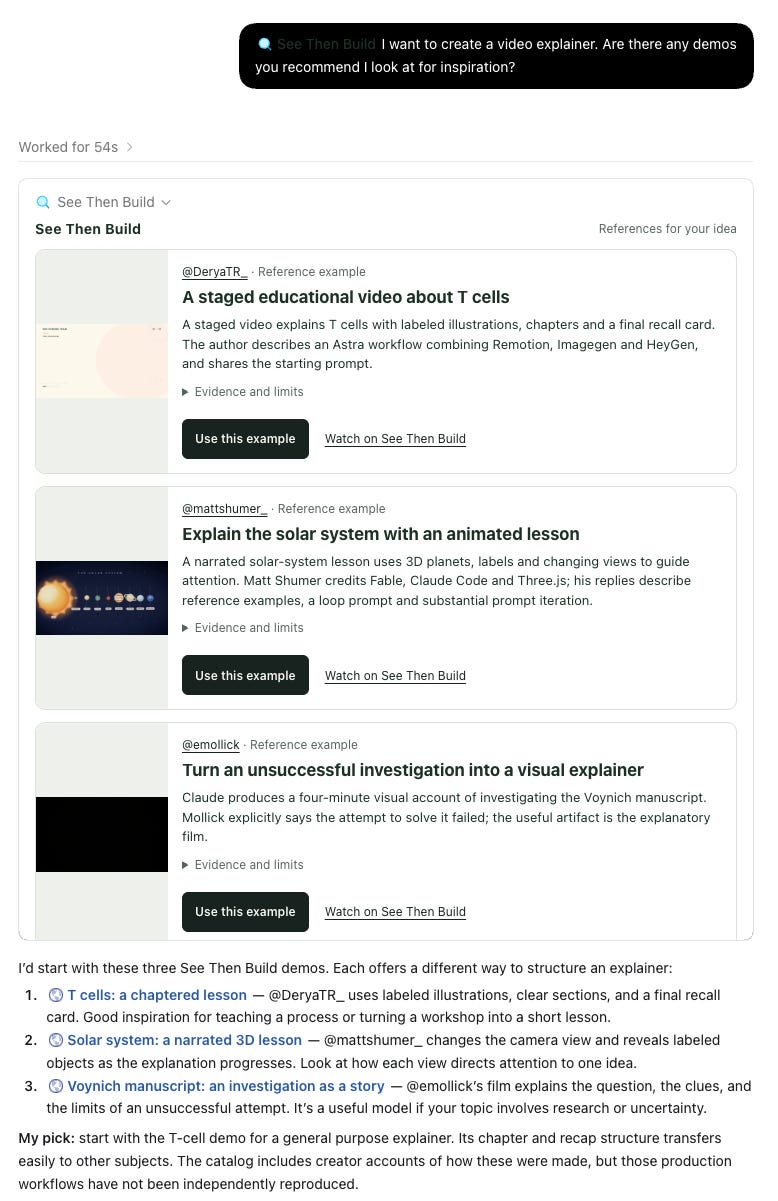
What’s also really cool is that if I wanted to charge people a monthly fee for access to this data, I could easily integrate Stripe.
See Then Build Illustrates Three Things You Need To Know
I didn’t write this post just to show off a project I’m proud of (one I couldn’t have built a year ago without paying tens of thousands of dollars).
I share the Site as an example on three levels.
First, See Then Build is an example of many of Sites’ coolest features:
User accounts
Databases
An admin area
Design
Interactions (browse, save, tag, and search)
Custom URL
Chrome extension
Plugin/MCP
Second, See Then Build is a template for a type of Site that I plan to reuse over and over:
If you take a step back, you’ll notice that See Then Build is more than just a site for AI demos. Rather, it’s a research machine with four parts:
Search
Filter
Store
Page
The visual below shares the bigger picture of different types of research you could do with these four parts:
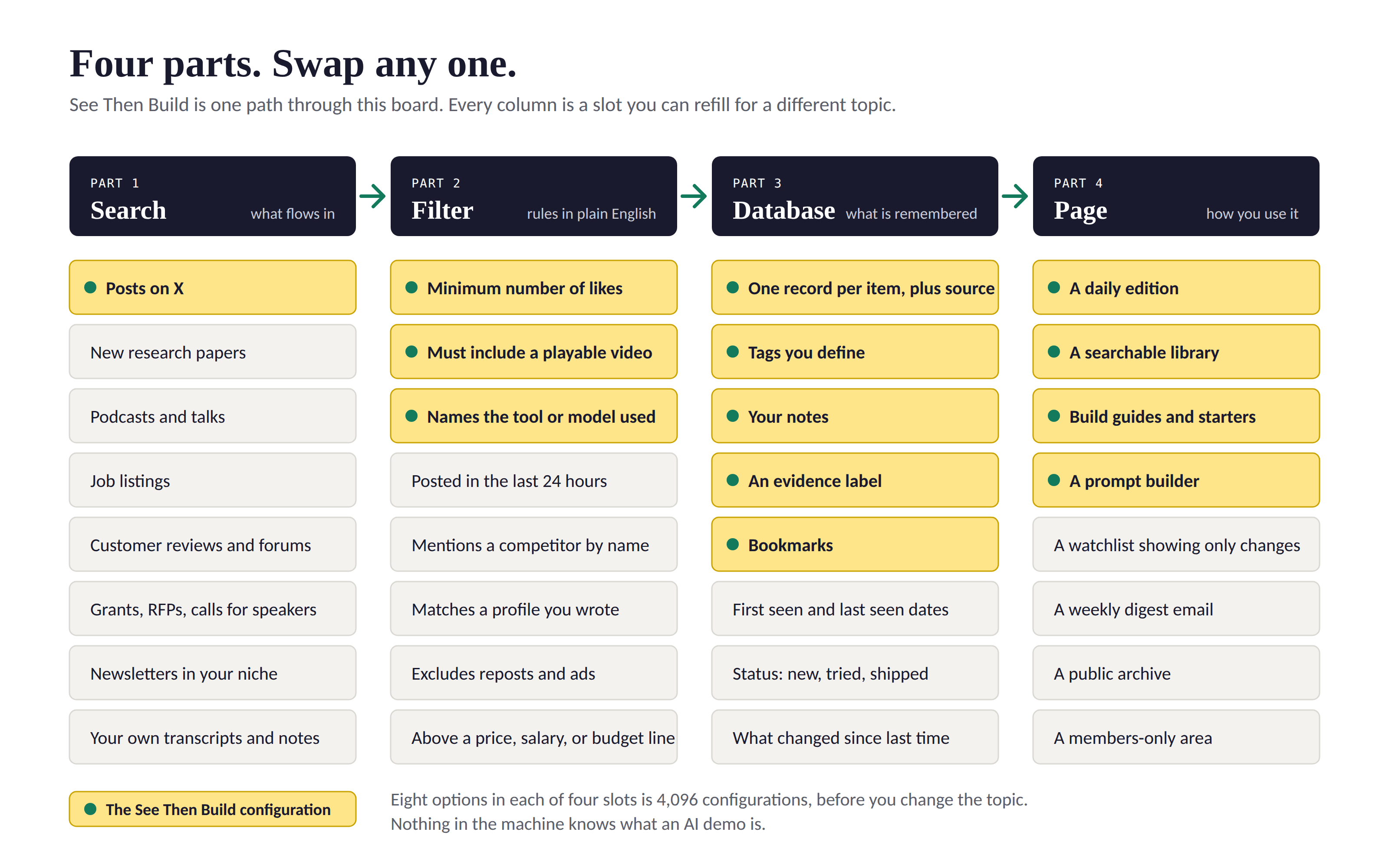
The same machine works for any topic where the best material is scattered and disappears fast:
The best posts in your niche each day, so you never miss what your audience is talking about
New research in your field
Podcast episodes and talks featuring the people you want to learn from
What customers are saying about your competitors
Speaking opportunities, grants, or RFPs in your industry
Every mention of your book, your brand, or your name
Said differently, See Then Build is the first version of a site template that I can use over and over again. Now that the template exists, the next one will take about a tenth of the time. I describe the new topic and the new rules, and then the machine gets rebuilt around them.
And again, I want to be clear about one thing: I’m not a coder. I didn’t write a line of code for this. I explained what I wanted, looked at what came back, and explained what to change, repeating this cycle until it worked.
Third, See Then Build is an example of a type of Site that I think is particularly exciting:
On the one hand, you can use Sites to create all of the typical sorts of Sites you might think of off the top of your head:
A client portal
A course website
An article companion
A personal brand website
A company website
But on a deeper level, Sites is an opportunity to Sell Your Sawdust: an opportunity to turn things you already do while creating your end product into a standalone website you use yourself, and that others will pay for or trade their email to access.
In my next article in the series, I’ll explain how you can use ChatGPT Sites to Sell Your Sawdust too.